Kitchen Toolkit · Platform overview
Platform overview

What Kitchen Toolkit is, why teams buy it, and how it works in real kitchens.

Kitchen Toolkit combines an offline-ready crew app, manager command centre, builder, AI help desk, and optional sensor monitoring into one restaurant operations platform.

Think of it as a cold-storage warning layer plus a digital clipboard for every shift: it helps teams catch temperature drift and emergency fridge/freezer readings earlier, reduce waste risk, publish updated SOPs and recipes fast, and export clearer records without binder chaos.

Sales, pilots, and tenant access are handled for business, institutional, and professional kitchen operators. Current hardware deployments may include pilot, evaluation, or pre-certification units for supervised indoor use until released otherwise in writing.

Coverage sketch

How to read this page

  • Start with the buyer outcomes: who benefits, what changes day to day, and why the platform is broader than a sensor feed or a phone app.
  • Review cloud-optional offline use, local export options, and the command-centre story for alerts, charts, logs, and exports.
  • Use the connectivity architecture section if you deploy in universities, public Wi-Fi, or enterprise environments with captive portals or IEEE 802.1X.
  • Then go deeper on the core platform surfaces: crew app, admin workflows, builder, AI help desk, provisioning, hub AP recovery, and shop flows.
  • Use the trust and governance cluster for data ownership, retention, security review, and pilot-scope questions.
  • Finish with the hardware deep dive and future roadmap if you need deployment detail or forward-looking context.
Why teams care

Start with the operational outcomes, then dig into the product depth.

Kitchen Toolkit is a broad platform by design. These sections lead with the day-one value for crews, chefs, managers, owners, and auditors before the page moves into setup, trust, and hardware detail.

Who benefits

Why crews, chefs, managers, owners, and auditors care.

Kitchen Toolkit is not just sensor monitoring and not just a mobile app. It connects day-to-day kitchen work, content updates, alerts, and records so shifts can stay more consistent with less paper, less drift, and less scrambling.

Staff

Tap through checklists, log temperatures and waste, and keep moving on shared tablets or phones without losing work when signal drops.

Chefs & trainers

Publish recipes, allergens, freshness guidance, and step-by-step procedures once, then keep every location aligned without reprinting binders.

Managers

See drift alerts, escalated temperature alerts, missed checks, exports, charts, device health, and push reminders in one command centre instead of juggling texts, spreadsheets, and paper.

Owners & operators

Help reduce waste, reduce labor spent chasing records, and keep control of operational data with tenant isolation plus export and deletion controls.

Auditors & guests

Reviews are easier when records are cleaner, faster to export, and backed by timestamps, signatures where used, and clearer operational histories.

Offline + export proof

Cloud sync is optional. The crew app still works.

Restaurant content stays available offline, logs stay on the device first, and teams can export locally or queue sends for later depending on what connectivity allows that day.
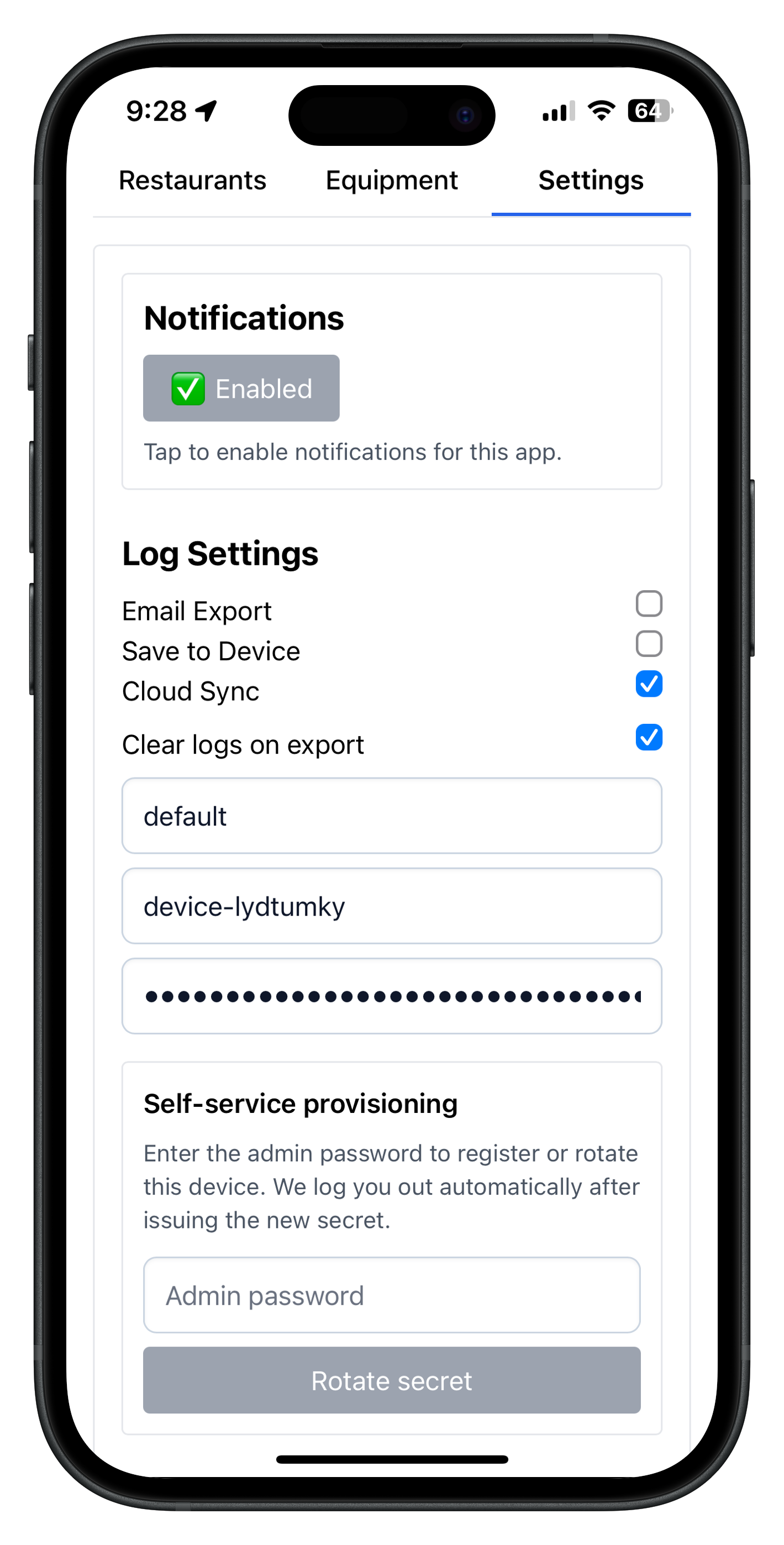
Crew export settings showing local save, email, and cloud options

What happens when internet drops

Kitchen Toolkit is built so frontline work does not stop when service is weak. Cloud upload is a feature, not a requirement for basic logging and export.

  • Logs are saved locally first so crews do not lose work during service.
  • Save to Device and CSV export keep records usable even without cloud delivery.
  • Email and cloud workflows can queue and retry later when connectivity returns.
  • Cached restaurant bundles keep checklists, recipes, allergens, and procedures available offline.
Command centre proof

Alerts, charts, logs, and exports live in one operator view.

The strongest management-side value is consolidation: Kitchen Toolkit brings response, reporting, and oversight into one surface instead of splitting them across inboxes, clipboards, and disconnected dashboards.
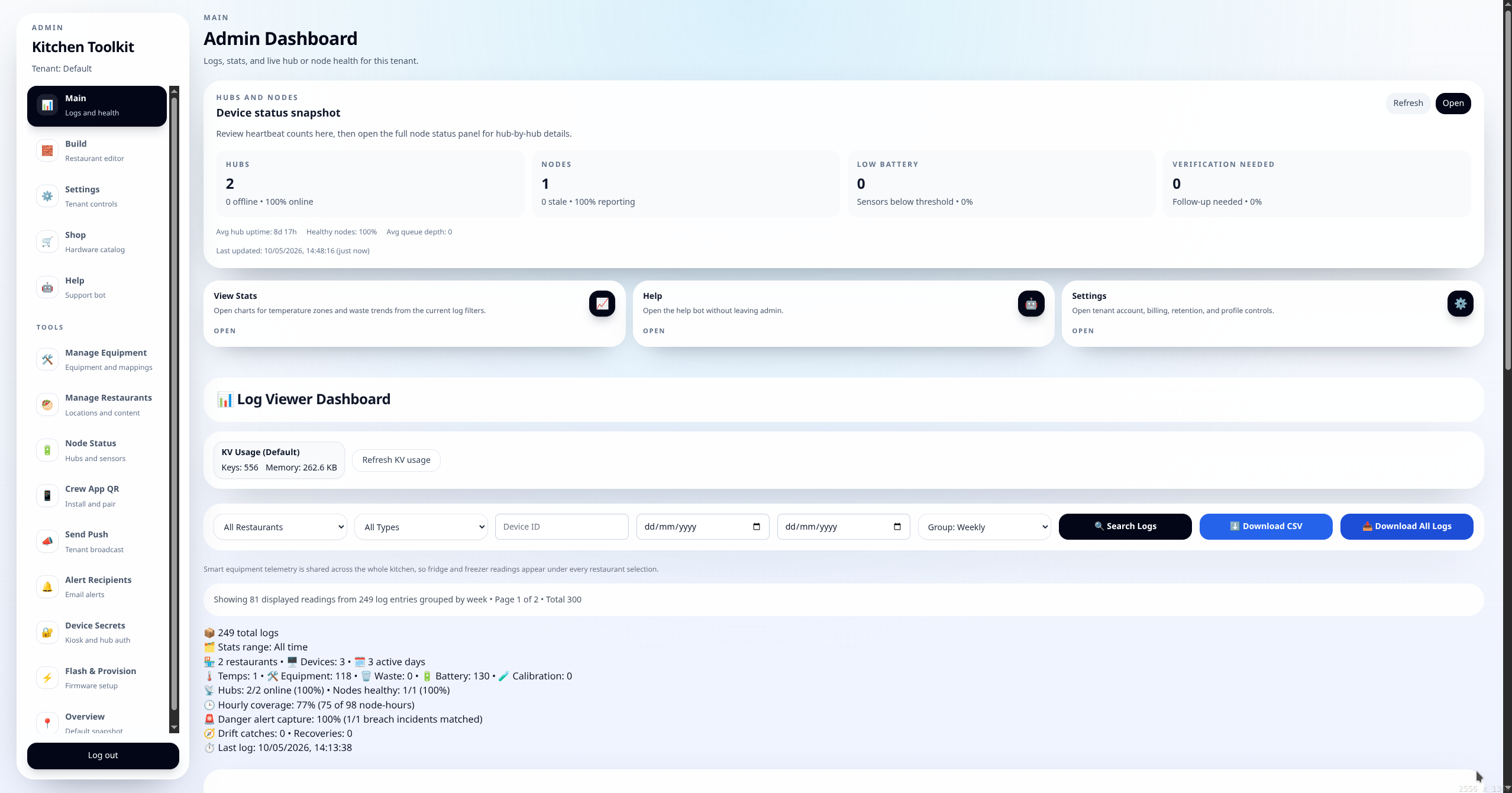
Kitchen Toolkit admin dashboard with logs, filters, charts, and export controls

What managers can prove quickly

The admin command centre turns operational issues into something teams can see, act on, and document without delay.

  • Temperature drift, escalated emergency readings, recovery, heartbeat silence, and low-battery issues surface with context.
  • Waste, temperature, battery, calibration, and reliability stats help teams spot patterns, not just react to one-off incidents.
  • CSV and email exports make inspector and QA requests faster to satisfy.
  • Equipment, restaurants, push reminders, device health, install guidance, and provisioning stay in the same workflow.
Stats depth

Stats now explain more than the charts alone.

The stats view has grown from a simple graph panel into a fuller operating review, giving managers one place to review food safety patterns, device reliability, and share-ready summaries before a meeting or audit.
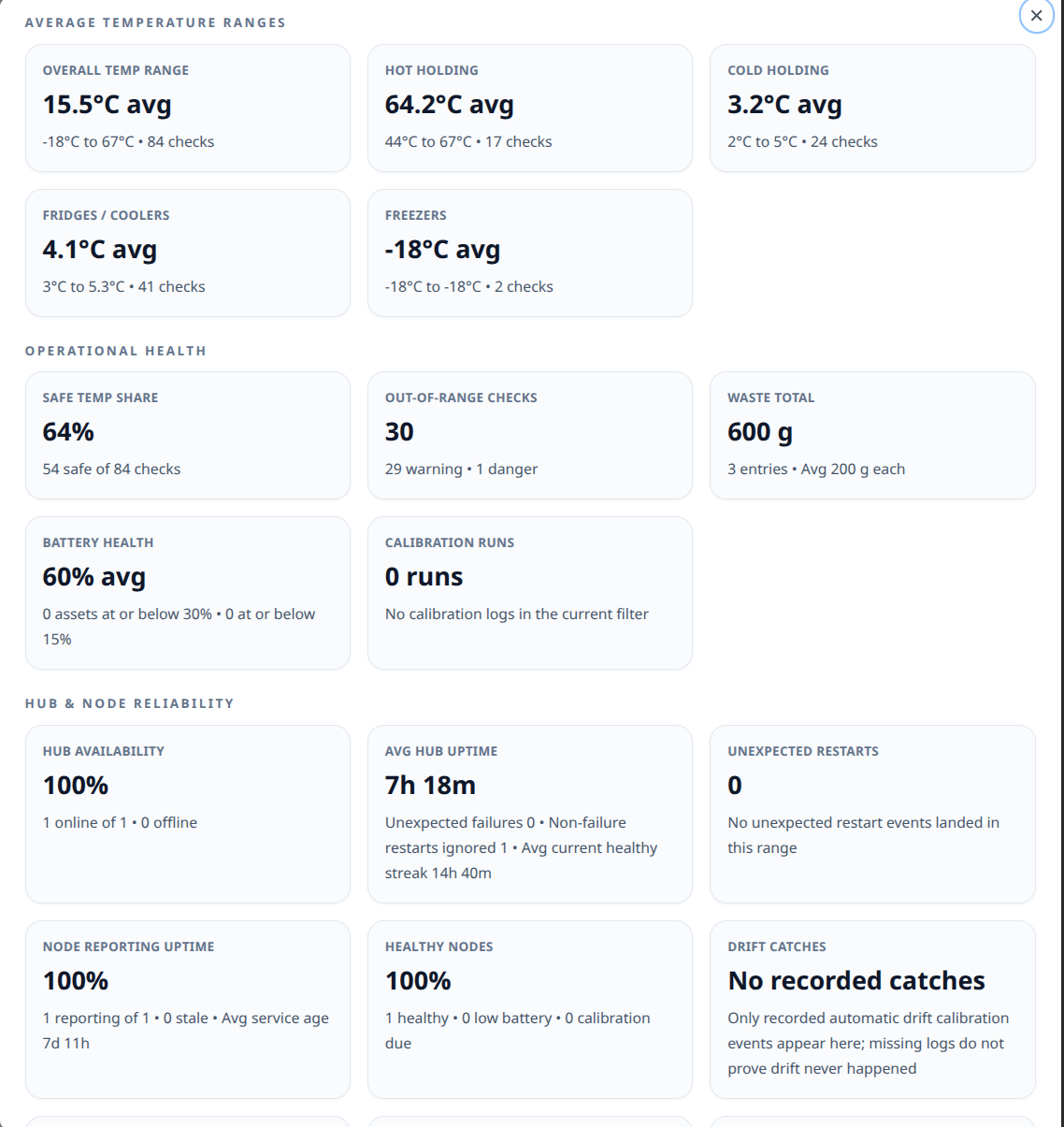
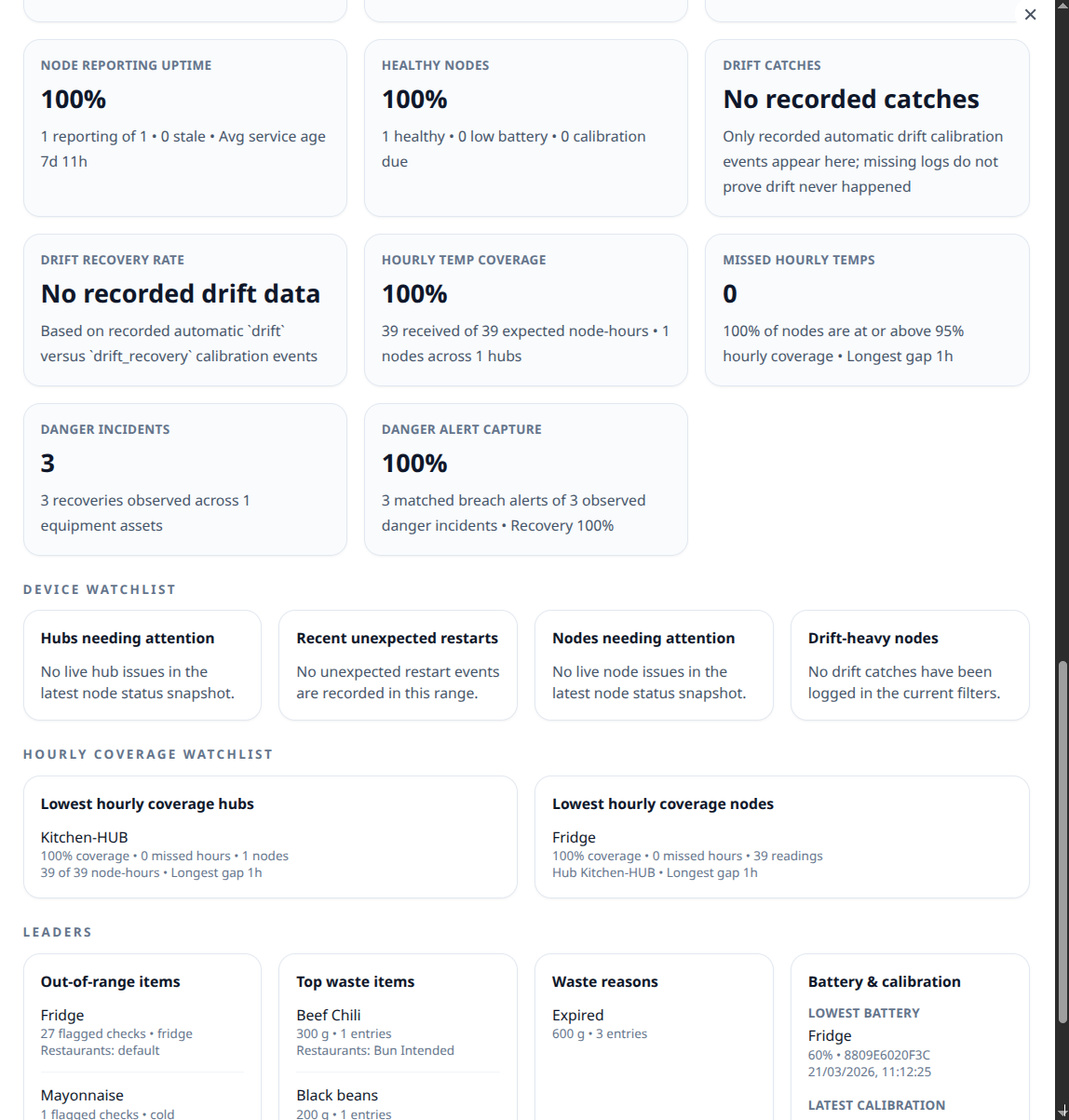
Kitchen Toolkit dashboard stats overview screenshot Kitchen Toolkit dashboard stats detail screenshot

One stats view for operators, QA, and service follow-up

Alongside the charts, Kitchen Toolkit now summarizes safe, warning, and danger checks, top waste items and reasons, battery lows, calibration runs, hub availability and uptime, restart history, node reporting gaps, drift catches, and danger-alert capture. The same panel can then produce a shareable CSV of the current review.

  • Range and unit controls let teams switch between week, month, or all-time context before a review.
  • Watchlists surface hubs, nodes, and equipment that need attention instead of forcing managers to scan raw logs.
  • Share / Export Stats sends the CSV through the device share sheet when supported and falls back to a direct download everywhere else.
Platform depth

Core platform, setup workflows, and support surfaces.

These sections go deeper on how the platform is assembled in practice: the crew runtime, admin command centre, builder, AI support, setup flows, and the operational tooling around them.

Why teams pick Kitchen Toolkit

Built for frontline reality—offline-capable, audit-friendly, and fast to roll out.

Our pilot approach uses live software, not slideware. You get the crew app, admin dashboards, builder, AI assistant, and provisioning flows working together from day one so teams can evaluate reduced waste risk, faster coaching, and easier audits from one system instead of a pile of tools.

Offline-first crew app

The app installs like a native app, caches each restaurant, and keeps checklists, recipes, allergens, temperatures, and saved records usable whether signal is weak, intermittent, or gone entirely.

  • Pull-to-refresh and install prompts tuned for shared tablets and phones.
  • Exports by email, CSV download, cloud sync, or local save so crews can work with the conditions they have.
Technical notes
  • Install/runtime lifecycle hydrates an app shell plus tenant restaurant bundles, then refreshes in controlled stages so active crews are not forced into brittle reload behavior.
  • Restaurant bundles are mirrored into precache artifacts, enabling deterministic cold starts even when live connectivity is unavailable at launch time.
  • Client export/log queues use cross-tab lock coordination and local snapshots so offline work survives refreshes, tab churn, and transient network loss.

Admin command centre

Filter by restaurant or equipment, spot missed logs, and export records for inspectors quickly. The admin runtime also combines log filters/search/grouping, CSV and chart views, equipment and restaurant managers, node status, crew QR install guidance, push controls, device secrets, guided flasher workflows, and hub AP/local control guidance in one place.

  • Alerts modal manages email recipients, and key admin workflows expose timestamps, status context, and export history for operational review.
  • Charts for temps and waste support faster audits; CSV exports can be sent to inboxes quickly.
  • Device list shows last-seen, battery, and rotates secrets with one click.
Technical notes
  • Hub and node health views are synthesized from independent liveness streams, then grouped for operator triage with stale, battery, and calibration state indicators.
  • Background health sweeps evaluate stale/offline transitions and route notifications through configured channels while suppressing duplicate state flapping.
  • Push delivery supports broad and targeted audiences with tenant authorization boundaries and subscription lifecycle pruning.
  • Audit exports degrade gracefully at scale by shifting to paged key scans when direct key listing is impractical.

Builder

The builder is an app that ships apps. Publish menus, checklists, and SOPs with one click; the platform caches them so every kitchen gets the update, even offline. Use the hosted default or bring your own content source if you prefer.

  • Per-account manifests; no app store waits for SOP or menu changes.
  • Platform handles caching during updates.
  • Marketing-ready bundles (HTML, CSS, metadata, icons) publish with one click, and each location receives its own offline app with branding and storage isolation.
Technical notes
  • Builder publishes tenant-specific bundle artifacts through an automated content pipeline, so operational content updates are versioned and repeatable.
  • Icon uploads are normalized to a consistent square PNG profile to avoid install/runtime inconsistencies across devices.
  • Prebuild jobs mirror published bundles into tenant precache trees and manifest indexes used by offline installers.

Sensor monitoring hardware (optional)

Long-range radio can work better than spotty Wi-Fi or Bluetooth around stainless steel. Guided setup gets gateways and sensors online quickly, escalated alerts call out emergency fridge/freezer readings, and factory-calibrated probes are meant to stay set-and-forget unless sustained drift is detected.

  • Hub firmware keeps a flash-backed queue of up to 64 pending payloads with exponential retry backoff (5s base, 5-minute cap).
  • Node firmware transmits on a 60-minute cadence by default and includes battery percentage in packets when gauge data is available.
  • Probes ship factory-calibrated, so normal rollout does not include scheduled recalibration.
  • Escalated alerts apply to fridge readings above 10°C at any point or sustained above 8°C, and freezer readings above -5°C at any point or sustained above -10°C.
  • Kitchen Toolkit only flags verification follow-up after sustained drift, service work, or a reading that still looks wrong in context.
  • Heartbeat alerts flag silent hubs or sensors quickly, so teams can distinguish device silence from upstream network issues.
  • Firmware includes battery and thermal safeguards, including low-charge safe cutoff behavior and thermal backoff before normal sampling resumes.
Technical notes
  • Optional telemetry uses a hub-and-node long-range radio topology tuned for indoor interference resilience, with frame integrity checks before acceptance.
  • Hubs enforce sample de-duplication windows and persistent store-and-forward buffering, then replay with exponential backoff and jitter after reconnect.
  • Node runtime is battery-oriented (deep sleep plus scheduled transmit cadence) while reporting temperature, battery, drift-driven verification state, and signal health.
  • Heartbeat streams include runtime and network health metrics so operations can distinguish sensor silence from upstream connectivity faults.

Grounded AI help desk

The AI help desk is designed to answer SOP and troubleshooting questions using approved training content so field teams, trainers, and new hires can get help with less guesswork.

  • Anonymous demo mode optional; responses are grounded with source context when available.
  • Human-readable guides are available alongside the assistant.
Technical notes
  • Assistant orchestration fuses product docs, tenant documentation, and repository context before response generation.
  • Post-processing sanitizes answers to prevent leakage of implementation-level artifacts in user-facing output.
  • Runtime guardrails include per-IP throttling, short-lived response caching, and bounded execution windows to stabilize latency under load.

System architecture summary

  • Tenant normalization is the partitioning primitive across web runtime, telemetry ingestion, alerts, exports, and provisioning workflows.
  • The platform is intentionally decomposed into coupled planes: content publication, frontline runtime, operator control, telemetry ingest, and grounded support.
  • Compatibility rewrites keep legacy default-tenant restaurant URLs functional while current deployments run through tenant-scoped paths.
  • Storage routing supports either managed defaults or tenant-provided backends without changing app semantics.
  • Tenant onboarding seeds profile/environment data, updates tenant registry, and supports deployment automation plus secure first-login setup.
  • Subscription billing is integrated as an optional lifecycle service without weakening tenant data-path isolation.
Help desk preview

AI help desk: grounded answers for field teams.

Support questions for SOPs, provisioning, and alert handling are answered with approved documentation context so teams can resolve issues faster.
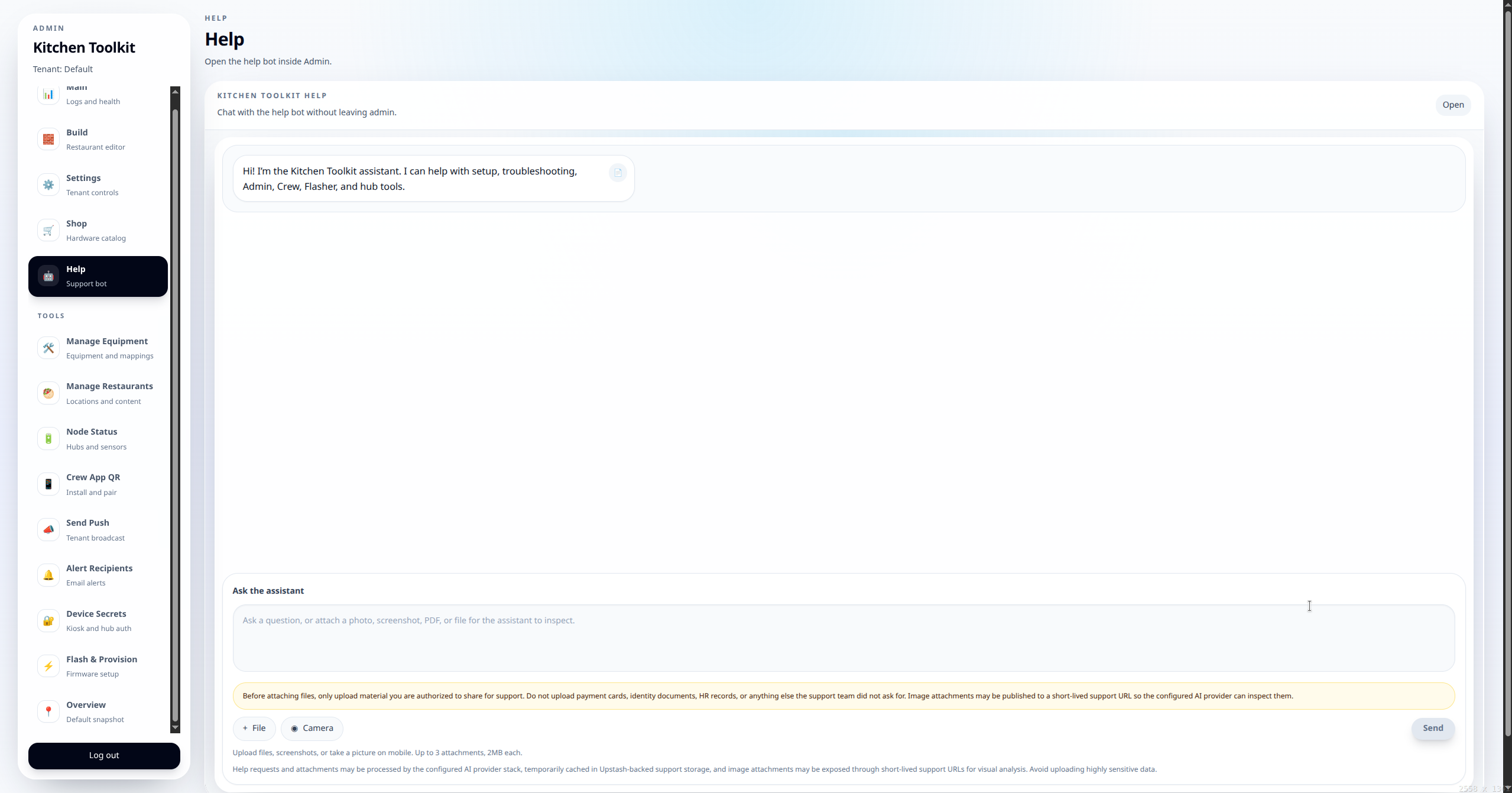
Kitchen Toolkit AI help desk chat interface

Operational support without guesswork

Teams can ask practical questions during service and troubleshooting while staying inside the same platform used for logs and alerts.

  • Grounded responses prioritize approved runbooks and internal docs.
  • Support paths are aligned with tenant access controls.
  • Help desk guidance can reference provisioning and alert workflows directly.
Provisioning preview

Guided flasher for hub and node onboarding.

Field teams flash firmware with a browser-guided flow that preloads tenant context and setup checkpoints before hardware is handed off.
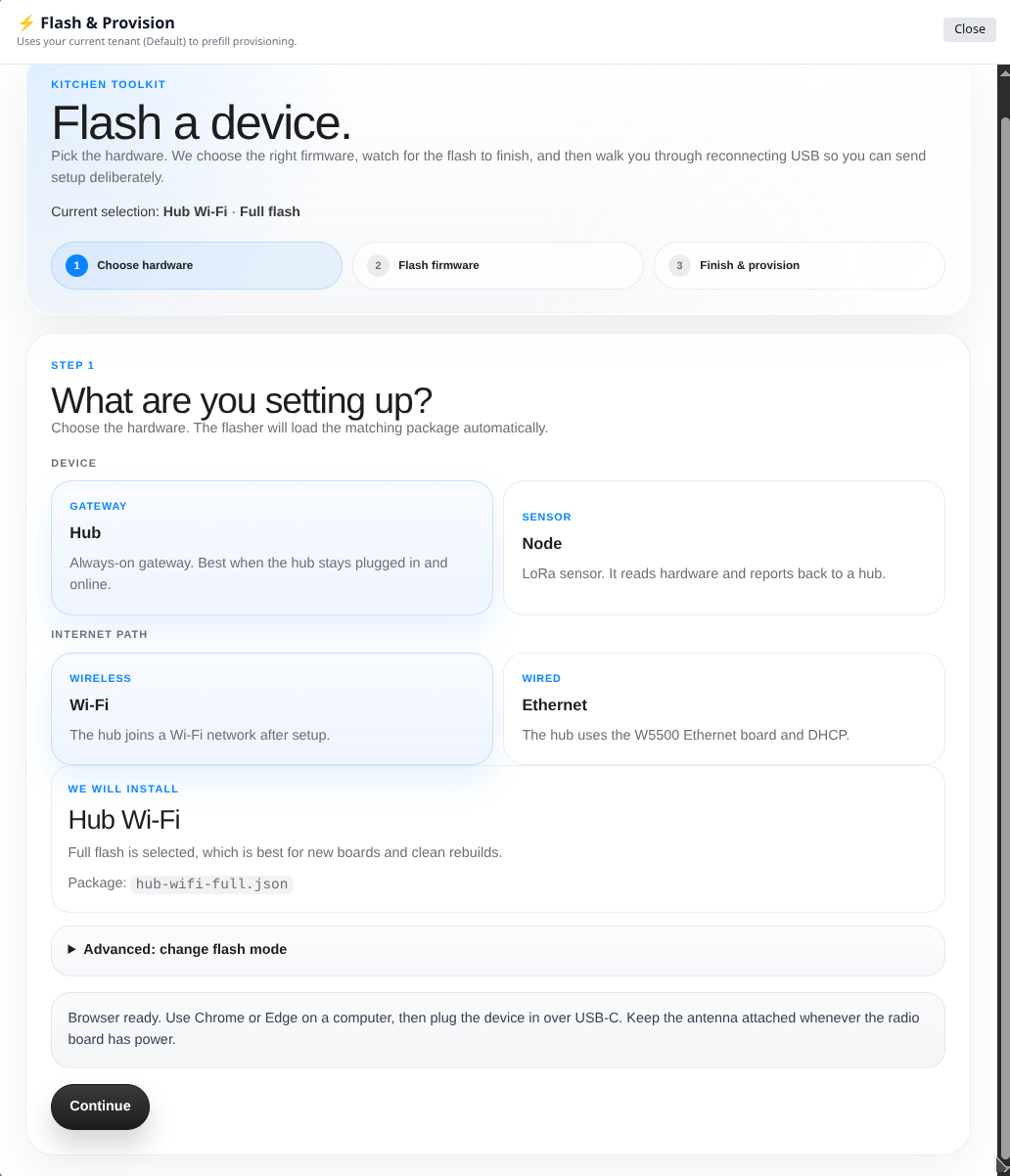
Guided flasher step-by-step setup screen

Commissioning flow

Provisioning ties firmware loading, device role selection, and operational validation into one repeatable process.

  • Guided steps reduce setup errors during first-time installs.
  • Commissioning aligns hardware state with tenant/location setup.
  • Installers can validate outcomes before operations handoff.

Provisioning runtime summary

  • Browser-native onboarding supports both wired flashing and wireless credential handoff, with capability checks for supported browser/hardware combinations.
  • Role-specific firmware packages are available for hub and node devices, including full images and app-only update paths.
  • Provisioning payloads carry tenant/location identity plus network and device credentials required for first secure check-in.
  • Hub networking supports Wi-Fi and Ethernet operating modes, with controlled secret rotation and recovery fallback paths.
  • Post-provision validation links onboarding to live heartbeat and grouped node-health dashboards for rapid installer verification.
Setup & secrets preview

Flash hubs, use the maintenance AP, and verify heartbeats.

Device secrets, local hub passwords, and maintenance-AP recovery are part of the same provisioning story so installers can complete secure commissioning in one pass.
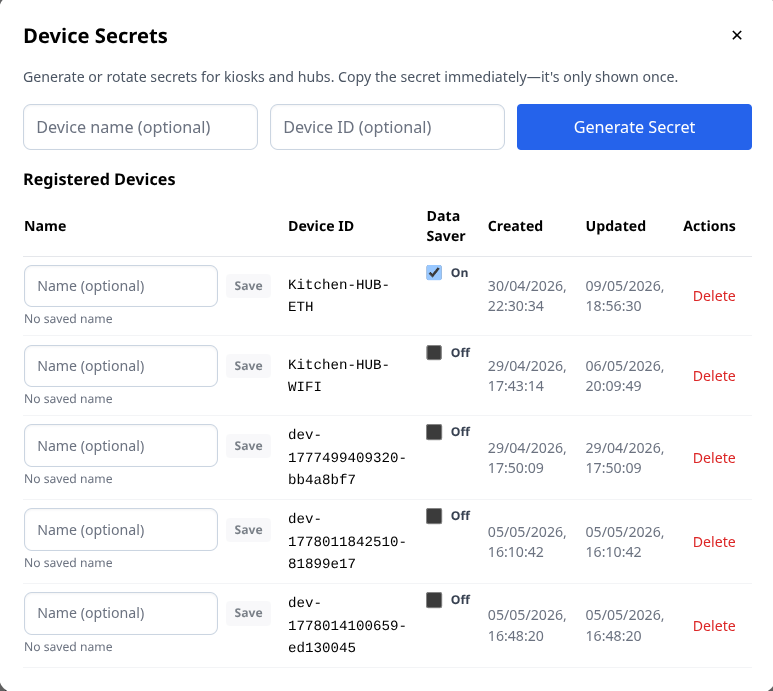
Provisioning and device secret management in admin

Secure onboarding controls

Mint and rotate secrets, assign device IDs, recover hubs over the maintenance AP, and confirm runtime health from one operational view.

  • Secrets are generated per device before first secure check-in.
  • The maintenance AP handles Wi-Fi recovery and fallback setup without a separate pairing page.
  • Heartbeat checks confirm devices stay online after commissioning.
Heartbeat preview

What the heartbeat is, and why it matters.

A heartbeat is the hub's regular check-in to Kitchen Toolkit. It is more than a simple ping: it proves the hub is still online, confirms it can reach the platform, and carries enough status data for operators to tell the difference between a silent sensor, a weak network, and a hub that actually needs attention.
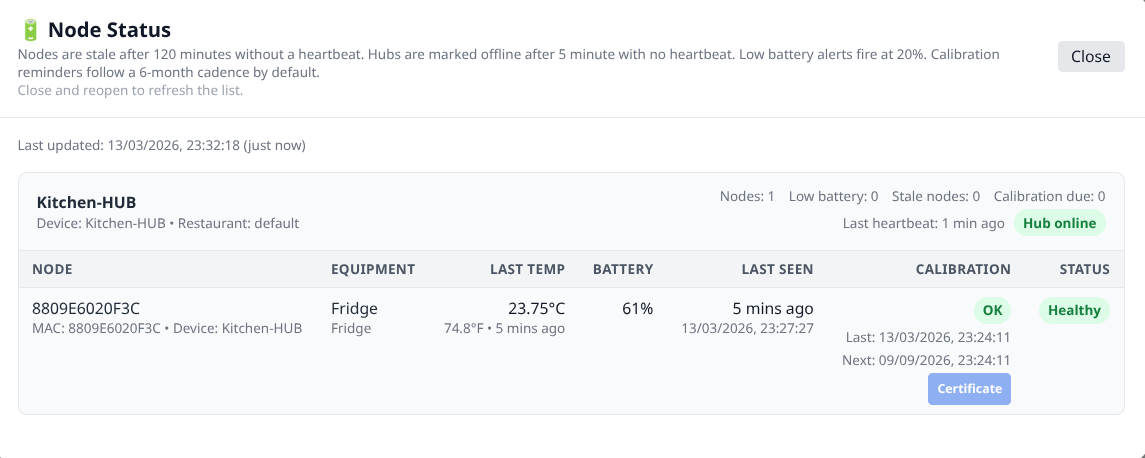
Kitchen Toolkit node status view showing the latest hub heartbeat and device health

What the heartbeat does in practice

The heartbeat is the platform's current operating signal for deployment health. It gives installers, operators, and managers status context they can review before they hand off a site or investigate a missing reading.

  • Confirms the hub is still online and reporting to the correct account.
  • Carries operational status such as uptime, IP address, queue depth, and node count.
  • Helps the dashboard show the latest check-in time instead of leaving teams to guess whether the hardware is alive.
  • Supports stale and offline detection when check-ins stop arriving on schedule.
  • Lets teams separate "the hub is up but a node is quiet" from "the whole telemetry path is down."
Shop preview

Hardware shop ties ordering to deployment workflows.

Operators can stage hub/node orders with tenant billing defaults and keep hardware pulls connected to active provisioning work. This flow is for business or organization deployments, and current hardware pulls may include supervised pilot or pre-certification units until released otherwise in writing.
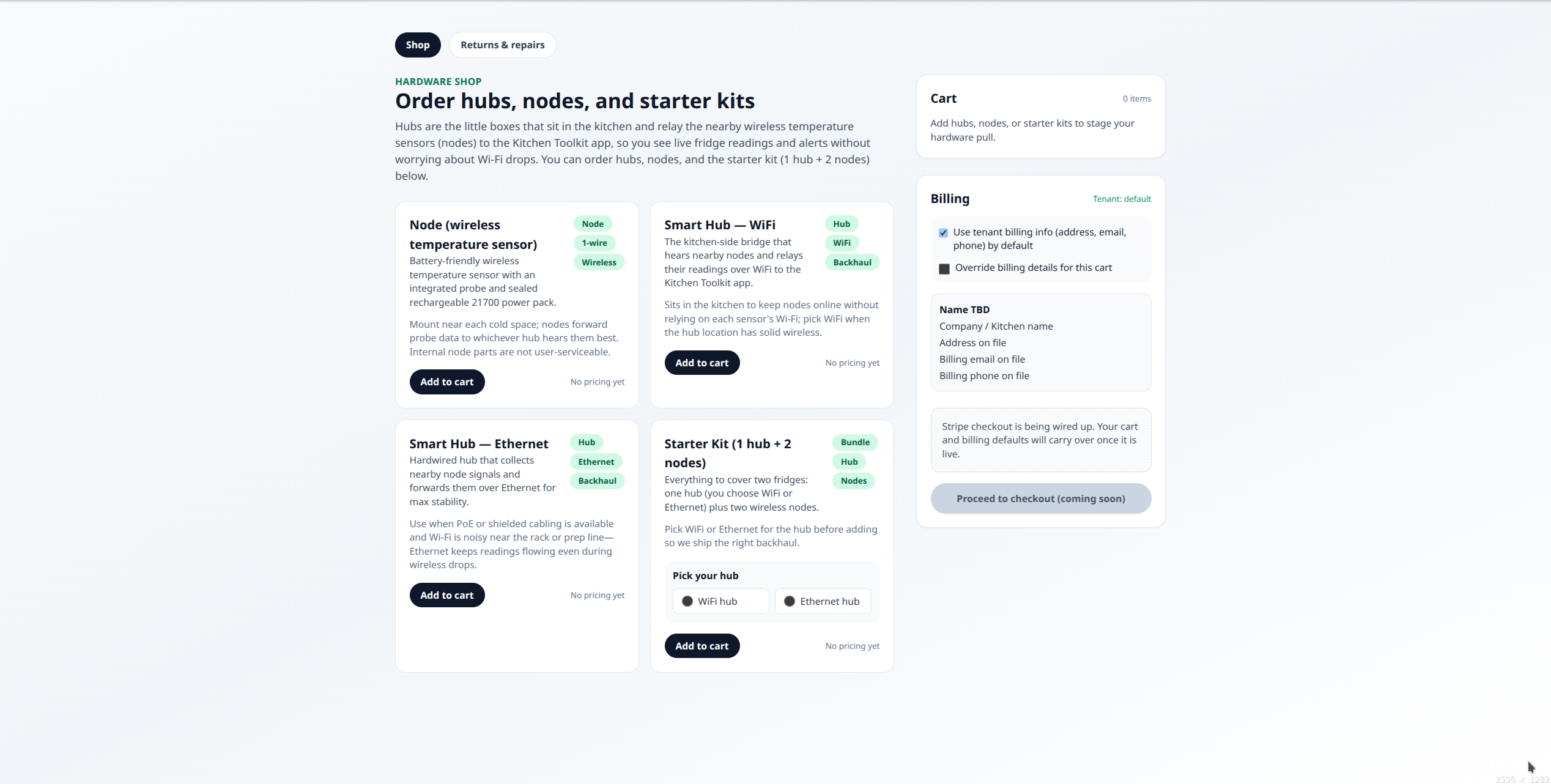
Hardware shop with hubs, nodes, and starter kits

Procurement in context

Starter kits, hubs, and nodes are grouped by deployment role so teams can move from order to install without rework.

  • Tenant billing defaults reduce repeat-entry friction.
  • Cart and billing views support staging by pull or rollout phase.
  • Ordering remains connected to provisioning and heartbeat verification.
Trust and governance

Review data ownership, retention, and governance controls.

These sections group storage, access, deletion, and legal-review considerations into one governance pass.

Data ownership & trust

Your account settings, optional storage routing, and exports stay under your control.

Kitchen Toolkit automates the workflows while keeping customer-facing controls visible in the product. This overview reflects the same platform features used in current pilots, alongside the current trust and legal documentation.

Tenant-managed account settings

We host Kitchen Toolkit with account-level isolation. You can use the default stack or plug in your own email and alert settings per account with no code required, and supported credentials can be rotated or revoked from the admin workflows.

Tenant-routed storage (optional)

Keep telemetry and equipment data in Kitchen Toolkit’s default storage, or route supported tenant data paths to your own KV endpoint if you prefer. Device authentication and some operator-managed services remain on platform infrastructure.

Signed device uploads

Device uploads are verified before storage, and access is scoped to your account so sensor payloads stay tenant-bound end-to-end.

Export & deletion controls

Admins can export data from the console, adjust retention settings, and use supported deletion tools without external support tickets.

Grounded AI controls

The assistant prioritizes approved runbooks and documentation so operational guidance stays grounded in the content you authorize.

Data & secret handling

  • Tenant environment payloads are encrypted at rest with authenticated encryption and decrypted only on trusted server paths.
  • Per-tenant overrides exist for messaging, alerting, retention windows, and storage backends, enabling policy isolation per account.
  • Retention policy is applied as records are written for logs, alert state, and liveness data to keep datasets bounded.
  • Administrative export and deletion workflows enforce tenant scope boundaries; cross-tenant export paths are blocked.
Hardware deep dive

Detailed hub and node operations.

This is the in-depth hardware version moved from landing so technical buyers and operators can review deployment details in one place.

Connectivity architecture

Restricted networks are why deployments use a cellular-backed uplink.

Many universities, public Wi-Fi systems, and enterprise networks assume interactive login or managed-device enrollment. For unattended monitoring hardware, that can make internet access unreliable, non-deterministic, and a poor fit for zero-touch operation. Kitchen Toolkit reduces that dependency by making WAN connectivity part of the deployment itself.

Problem: unreliable or restricted networks

Captive portals, browser-based sign-ins, expiring sessions, and IEEE 802.1X are common on managed Wi-Fi and Ethernet. Those controls work for laptops and phones, but they create avoidable failure points for headless IoT devices expected to stay online unattended.

  • Captive portals require interactive browser login.
  • 802.1X typically requires per-device credentials or enrollment.
  • Session expiration and policy changes break predictable runtime behavior.

Solution: self-contained cellular uplink

The preferred path uses an industrial LTE router and a carrier-agnostic IoT SIM. The router provides the hub with local private networking, while LTE handles the upstream path to the platform without depending on venue Wi-Fi or managed Ethernet.

  • Industrial LTE router: LTE Cat 4 modem, Ethernet + Wi-Fi routing, NAT, DHCP, and watchdog capability.
  • Carrier-agnostic IoT SIM: global IoT SIM profile support with multi-network access across major carriers.
  • Designed for low-bandwidth telemetry rather than user-device browsing patterns.

Deployment effect

This changes the system from a network-dependent IoT device into a more self-contained monitoring deployment. The hub gets a more predictable outbound internet path without requiring a browser, a UI, or repeated on-site reauthorization.

  • Works anywhere cellular coverage is available.
  • Reduces rollout friction in restricted environments.
  • Supports unattended, headless operation after install.
Long-range wireless sensor nodes
Hub / gateway device
Dedicated LTE router
Public internet
Cloud API / alerting system

How it works in the field

The cellular router establishes the WAN session, while the hub behaves like any other downstream device on a private local network. This keeps the deployment simple for installers and predictable for operators.

  • The LTE router establishes a cellular data session using the IoT SIM.
  • The router handles NAT, DHCP assignment, and router-level reconnect/watchdog behavior.
  • The hub connects by Ethernet, receives a private IP address, and gets full outbound internet access.
  • Telemetry and heartbeat traffic leave over outbound HTTPS to cloud endpoints.
  • No inbound ports are exposed as part of the normal deployment model.

Network independence

The deployment does not depend primarily on venue Wi-Fi credentials, captive portals, or enterprise authentication systems. That makes site-to-site rollout more repeatable.

Deterministic connectivity

Removing expiring sessions and login timeouts reduces the chance that a healthy device appears offline simply because a borrowed network changed policy.

Headless operation

Under normal operation, no browser, local UI, or repeated human intervention is required after deployment. That is a better operating model for unattended monitoring hardware.

Multi-carrier resilience

The IoT SIM can switch among supported available carriers for the area, which can improve uptime when one network is weak inside a building or at a remote site.

Low-bandwidth efficiency

The traffic profile is telemetry-heavy and lightweight, typically in the tens of MB per month rather than consumer-device levels of usage, which keeps operating cost low.

Reliability features

  • Router-level watchdog and automatic LTE reconnect behavior.
  • Application-level health checks and heartbeat monitoring.
  • Outbound-only transport paired with store-and-forward queues on the hub.

Security model

  • No inbound ports or directly exposed device services are required in the normal deployment model.
  • Encrypted HTTPS to cloud endpoints.
  • Hub sits behind NAT and is not directly addressable from the public internet in the normal deployment model.

Why cellular instead of campus Wi-Fi or Ethernet?

  • Requires login: managed Wi-Fi often yes; cellular no.
  • Session expiration: managed Wi-Fi often yes; cellular no.
  • Headless compatibility: managed Wi-Fi poor; cellular native.
  • Deployment complexity: managed Wi-Fi high; cellular low.
  • Reliability in restricted environments: managed Wi-Fi variable; cellular higher and more predictable.

Short version for pitch

The system uses a dedicated LTE gateway with a multi-carrier IoT SIM to provide a cellular-backed uplink path. This reduces reliance on Wi-Fi or enterprise networks and is designed to support headless operation without repeated local authentication or manual reconfiguration.

Hub & node guide

What hubs and nodes are, and what each one does.

A hub is the always-on bridge device in the kitchen. A node is the small sensor device at the equipment. Nodes use factory-calibrated probes, are intended to be set-and-forget in normal service, and only need follow-up when sustained drift is detected or service work changes the probe.

Hub (gateway role)

The hub is the bridge between local sensors and the platform. It stays online, monitors node health, and forwards readings and status updates to the dashboard.

  • Receives wireless readings from all nearby nodes.
  • Buffers data locally when internet is unstable.
  • Replays queued data and heartbeat updates after reconnect.
  • Reports firmware version and update state back to local status and admin tooling.

Node (sensor role)

The node is the battery-powered sensor endpoint mounted near monitored equipment. It samples temperature with a factory-calibrated probe and sends periodic updates to the assigned hub.

  • Captures equipment-side measurements on a fixed cadence with a factory-calibrated probe.
  • Sends battery and signal-health context with samples.
  • Uses low-power runtime behavior for long unattended, set-and-forget operation.
  • Appears in grouped health views for stale, battery, and drift-based verification triage.

Calibration & verification model

Kitchen Toolkit does not put probes on a calendar-based recalibration schedule. They ship factory-calibrated, and the platform only asks for a follow-up verification when sustained drift is detected, after service work, or when a reading still looks wrong in context.

  • Normal installs are meant to be set-and-forget.
  • Sustained drift triggers a verification-needed state instead of a generic calendar reminder.
  • If drift clears on its own, the node returns to normal without unnecessary manual work.

Provisioning, recovery & remote updates

Hardware setup is part of operations: devices are flashed, paired, credentialed, and validated before they are considered ready for operational handoff, then hubs can be maintained remotely without redoing full bench setup for every bug fix.

  • Use guided flasher steps to load hub or node firmware by role.
  • Mint and rotate secrets, then bind devices to tenant and location context.
  • Recover Wi-Fi or fallback connectivity from the local maintenance AP and dashboard.
  • Publish new hub app firmware and updater-enabled hubs can apply it without wiping saved provisioning.

Coverage & overlap

Kitchen layouts are not always clean, so the platform now supports overlapping hub coverage when one sensor should remain visible through more than one listening point.

  • One node can stay associated with the same equipment record across multiple hubs.
  • Admin resolves those reports back to the canonical equipment mapping instead of splitting them into duplicate placeholders.
  • Useful for redundancy, tricky layouts, and staged network transitions.

3D view of a node

Rotate the model to inspect the node hardware form factor used in telemetry deployments.

Future roadmap

Planned expansions for guests and automation.

Forward-looking initiatives are tracked here so buyers can separate current capabilities from upcoming roadmap work.

Future roadmap

Planned expansions for guests and automation.

We are building toward customer pickup and optional automation paths that modernize kitchens without disrupting daily ops.

Mobile order + pickup app

We plan to add a customer mobile ordering app so guests can order from their phones, then pick up at a station by scanning a QR code.

  • QR code scanners validate pickups at the station.
  • Thermal receipt printers generate order tickets so staff can sort and sticker for easy handoff.

Cross-platform POS

Planned POS tooling will run on Windows and Linux with a focus on easy customization and fast deployment.

  • Standardized install flow for shared terminals.
  • Configurable layouts and workflows per concept.

AI-assisted inventory and ordering

AI-assisted inventory and ordering feature that analyzes usage trends, predicts depletion, and recommends optimized food orders automatically.

  • Usage trends can inform prep, purchasing, and par-level decisions.
  • Recommended order quantities can help reduce overbuying and stockouts.