Supervised pilots · Live stack

Kitchen Toolkit is a digital kitchen operations and food safety platform designed to replace paper logs, SOP binders, cleaning sheets, and manual temperature tracking.

Manage checklists, recipes, cleaning tasks, temperature logs, audit-ready records, and optional wireless fridge/freezer monitoring from one centralized system that works online or offline — so kitchen teams can keep operating even during internet outages.

Technical snapshot

  • Kitchen Toolkit runs as a tenant-scoped multi-plane system: crew runtime, admin operations, content publishing, device onboarding, telemetry ingestion, and grounded support.
  • The web runtime uses versioned cache partitions and deterministic fetch policy so frontline workflows remain resilient offline while operational control surfaces stay network-authoritative.
  • Reliability is store-and-forward across browser and hub runtimes, with queue replay, lock coordination, and de-duplication to reduce duplicate submission risk after reconnect.
  • Security controls are layered end-to-end: signed sessions, anti-forgery checks, optional bot/2FA gates, and signed device telemetry validated before ingest.
📱 Works without internet with local saves, save-to-device exports, and queued retries when service returns.
🧭 Admin dashboard runs alerts, exports, device health, push reminders, and crew notifications.
📡 Long-range radio sensors use factory-calibrated probes and are meant to be set-and-forget unless sustained drift is detected.
🧠 AI helper troubleshoots and answers using docs, code, and your account’s restaurant content.
📄 SOPs, recipes, allergens, expiry tracking, checklists, and logs are built to replace binders.
⚙️ Structured workflows cut training time, labor waste, and process drift across shifts.
🧾 Timestamps and signatures where available reduce forged or inconsistent manual records.
🔔 Email and push alerts notify you when temps go out of range, with additional escalated alerts for emergency fridge/freezer readings.

Kitchen Toolkit helps teams monitor and document kitchen operations. It does not replace manual food-safety checks, human review, or emergency response procedures. Standard sales, pilots, and tenant access are for business, institutional, and professional kitchen operators, and current hardware deployments may include supervised indoor pilot or pre-certification units until released otherwise in writing.
Crew app preview

See the crew app in action.

This is the frontline experience crews use during service: checklists, recipes, allergen lookups, and logging in one fast mobile flow.

Crew app, explained

The crew app is the day-to-day operating surface for line staff and shift leads. It is designed for quick taps, shared devices, and low-signal kitchen environments.

  • Run opening, shift, and closing flows with structured checklists.
  • Capture temperatures and waste with timestamps in seconds.
  • Search recipes, step-by-step guides, and allergen context on demand.
  • Keep working offline and sync automatically when signal returns.
Technical notes
  • The preview uses the same iPhone shell proportions and notch treatment used in the install guidance overlay on the main app route.
  • The preview plays `public/app-preview.mp4` in muted autoplay mode for instant visual context without requiring user interaction.
Who it helps

Everyone in the kitchen wins.

Plain-language tools for busy crews, chefs, managers, and guests—no IT headaches required.

Frontline staff

Complete opening/closing checklists, log temperatures, and record waste without paper. Progress saves offline, and reminders keep tasks on schedule.

Chefs & trainers

Swap binders for a searchable recipe and SOP library. Update menus once in the builder and every location refreshes automatically.

Managers & auditors

See who logged temps, who missed them, and export CSV records quickly. Email and push alerts fire when coolers drift, emergency thresholds are crossed, or nodes go quiet.

Guests & customers

Allergen calls, expiry rules, and temperature alerts help teams reduce mistakes. Consistent prep can mean fewer surprises for guests and staff.

Offline by default

Built for basements, walk-ins, and bunkers.

Offline caching stores restaurant content, queues each tap, and retries when connectivity returns. Optional long-range radio hubs help reduce dead Wi-Fi spots, and you can still save to device if there is no cloud.

Precache everything

Caches checklists, recipes, allergens, and forms per restaurant so crews can keep working in low/no-signal areas.

Offline queues & retries

Logs are stored locally with retry/backoff. You can export to email, CSV, cloud, or local storage depending on connectivity.

Long-range radio telemetry

Hubs buffer sensor data and backfill when online; push and email alerts warn the right people if equipment gets too warm or cold, an escalated emergency threshold is crossed, a battery is low, or a sensor stops checking in. Factory-calibrated probes are intended to be set-and-forget, with verification only when sustained drift is detected.

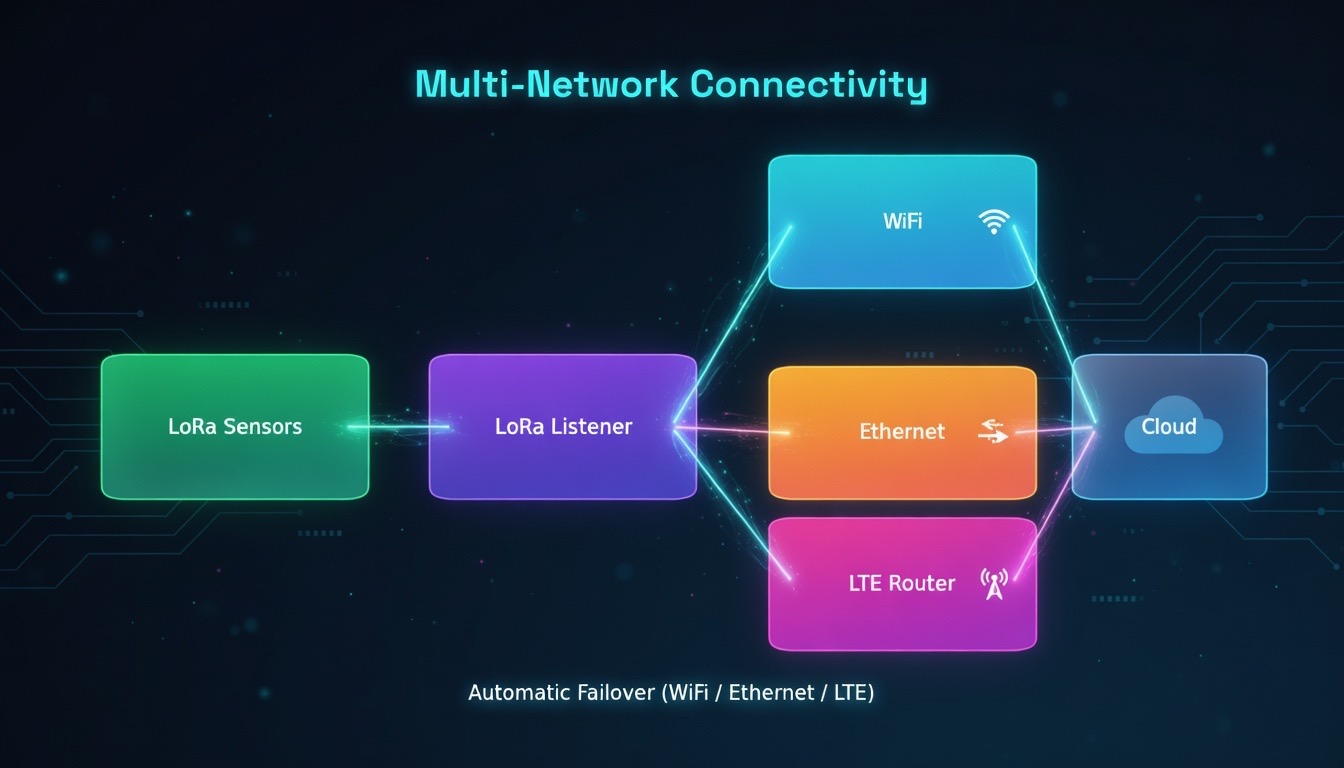
LTE & multi-path uplink

Plug a dedicated LTE router into the hub for a self-contained cellular path — no site Wi-Fi required. Connects over Wi-Fi, Ethernet, or LTE with a carrier-agnostic SIM that auto-selects the strongest available network. Headless and self-healing: recovers from drops without a screen, login portal, or on-site visit.

Offline runtime behavior

  • Restaurant discovery uses tiered resolution (live list, cached synthetic manifest, then static precache manifest) for deterministic offline startup.
  • Navigation is network-first with resilient fallback shell, while sensitive management views are intentionally excluded from offline caching.
  • Only selected read flows use cache fallback; write and control traffic remains network-authoritative to avoid stale control actions.
  • Telemetry hubs complement browser offline logic with independent queue persistence and replay, so capture can continue through WAN outages.
Export + offline sync

You do not need cloud sync to use Kitchen Toolkit.

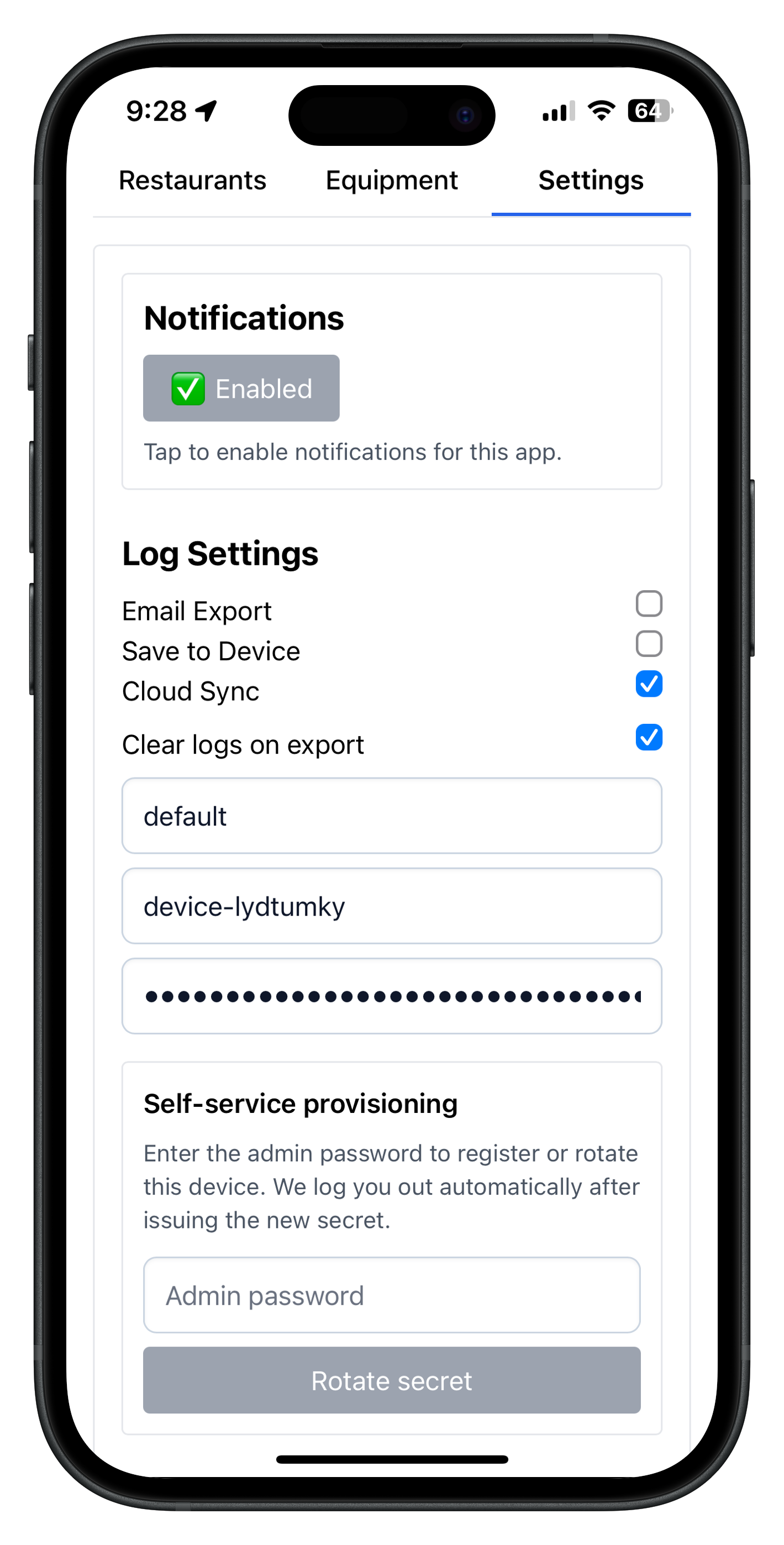
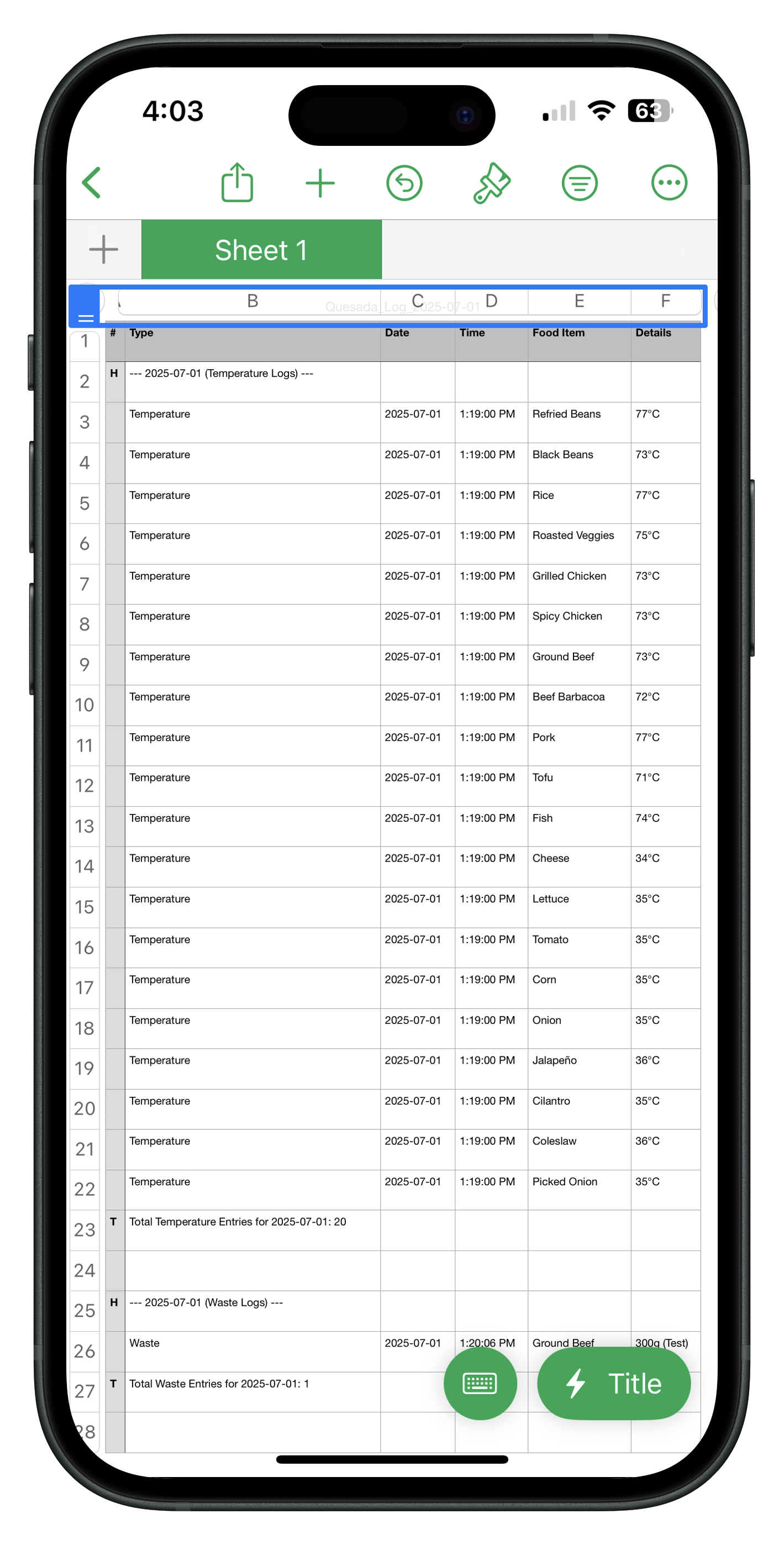
Cloud Sync is optional in settings. The app can run local-first with service-worker caching, save logs on the device, export CSV files locally, and queue email exports that send automatically when the connection returns.

Kitchen Toolkit export settings and local save options Kitchen Toolkit export actions for local CSV and email

How offline + exports work in production

Service worker caching and local queues keep frontline flows usable without internet while export methods remain configurable per account.

  • All logs are saved to the device first, so work is retained even when internet is down.
  • Cloud Sync, Email Export, and Save to Device are separate toggles; cloud is not required for logging or exporting.
  • When cloud is enabled, uploads try immediately and fall back to queue jobs if offline or a request fails.
  • Email export jobs queue offline and are auto-flushed on app load and when the browser reports connectivity again.
  • Local export writes CSV directly to the device, and logs can be kept or cleared after export based on settings.

Service worker + queue detail

  • The service worker preloads the app shell, startup routes, and restaurant assets into offline cache buckets.
  • General app navigation is network-first with cached fallback, while sensitive management surfaces stay online-only by design.
  • Equipment data uses network-first behavior with last-known cache fallback when available, without inventing offline records.
  • Export queue jobs use cross-tab locking and retry counters so failed sends can be retried safely.
  • Queued email exports send automatically after connectivity returns.
Admin preview

Admin dashboard: one secure command centre for operators.

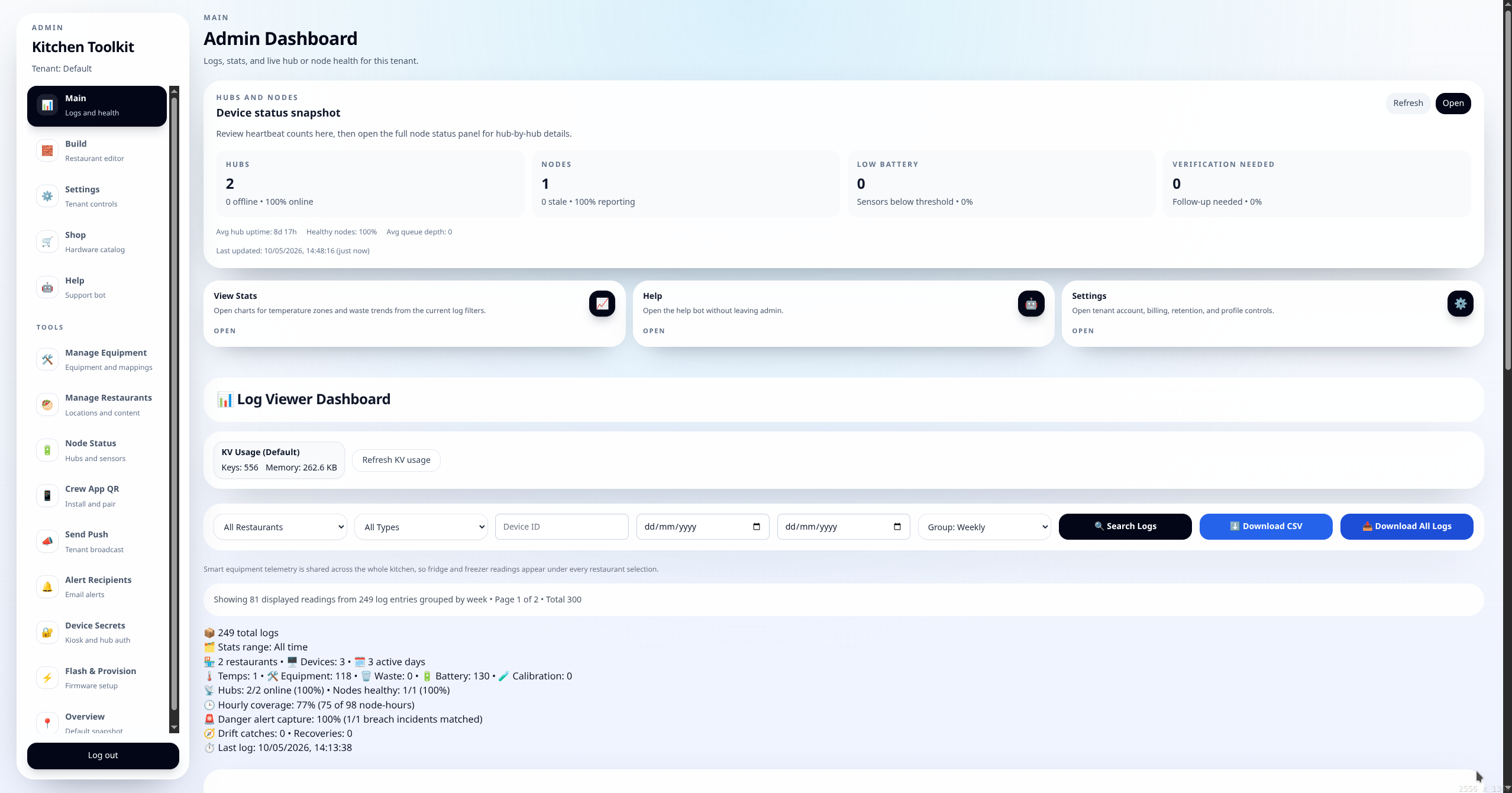
The dashboard now covers the full `/admin` workflow: logs, filters, exports, charts, equipment, restaurants, node health, push, secrets, flashing, hub AP recovery, and hardware operations.

Admin dashboard with logs, filters, and export controls

What managers do in admin

Filter by restaurant, equipment, waste, alerts, or verification records, drill into incidents, run grouped exports, and execute operational workflows without jumping between tools.

  • Logs, search/group controls, and CSV exports support faster audit preparation and internal review.
  • Equipment and restaurant managers, node status, and device secrets sit under one session.
  • Push controls, guided flasher, and hub AP recovery/setup flows are integrated into daily operations.
Alerts preview

Alert visibility across push and email.

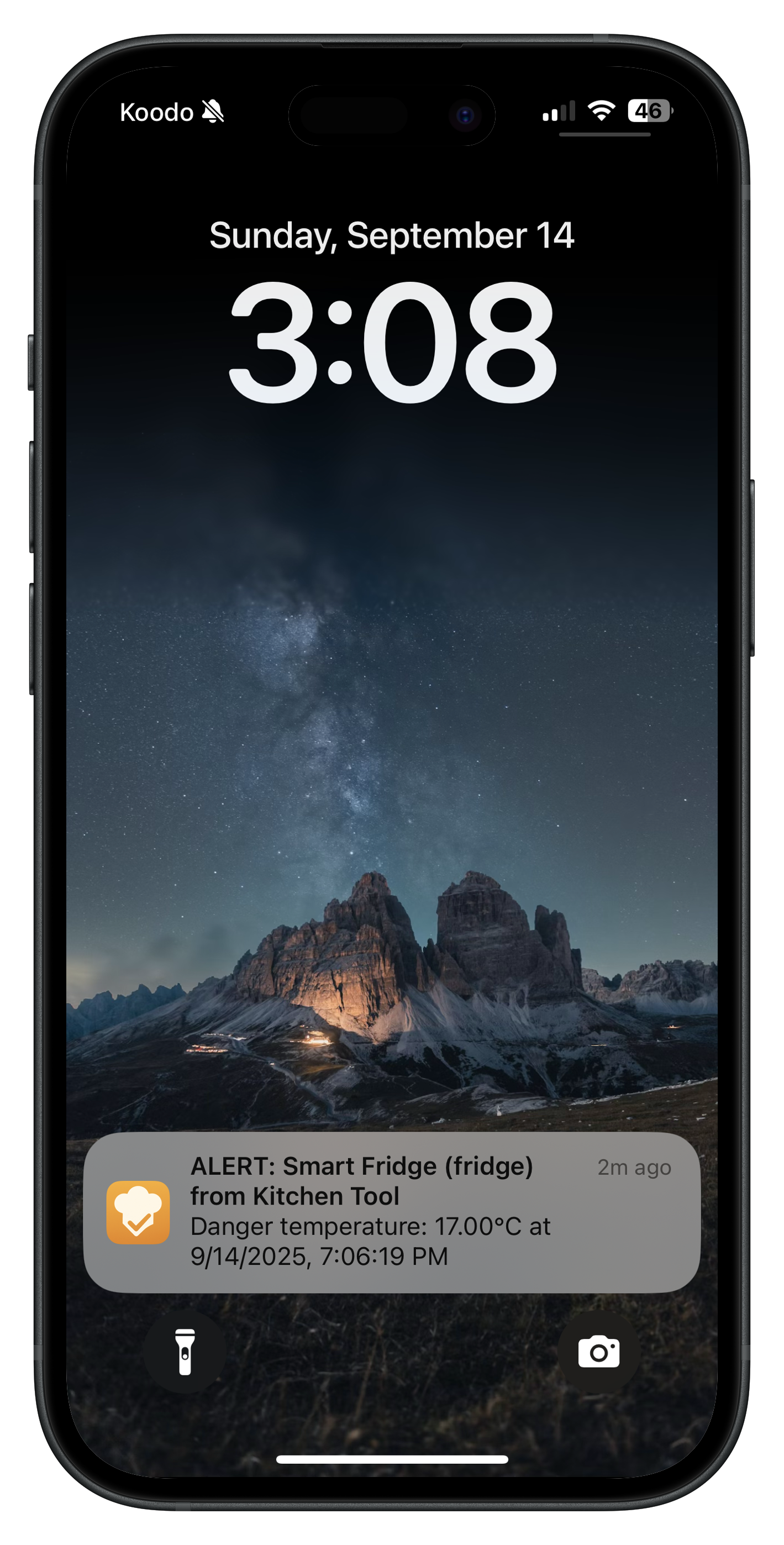
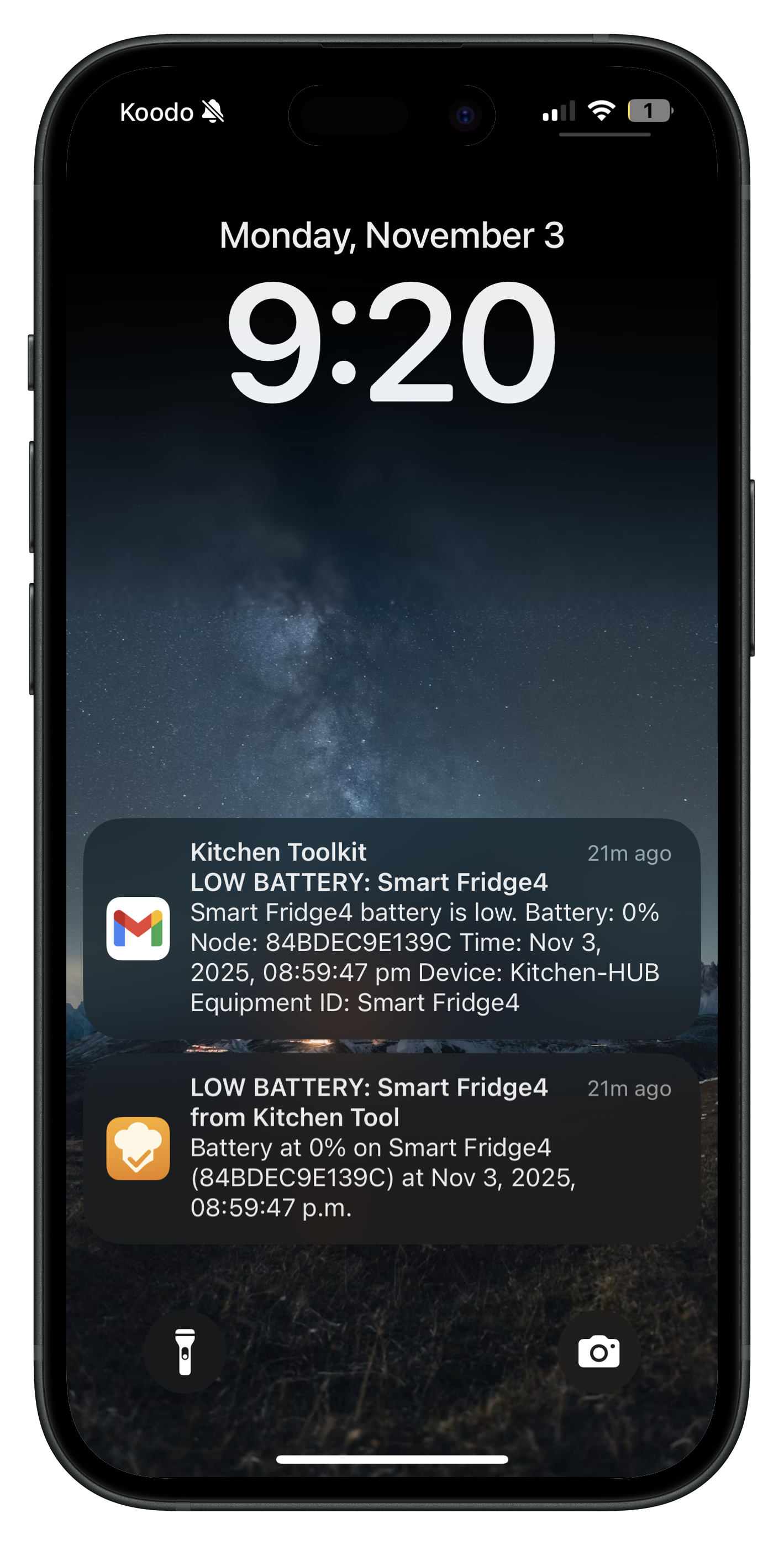
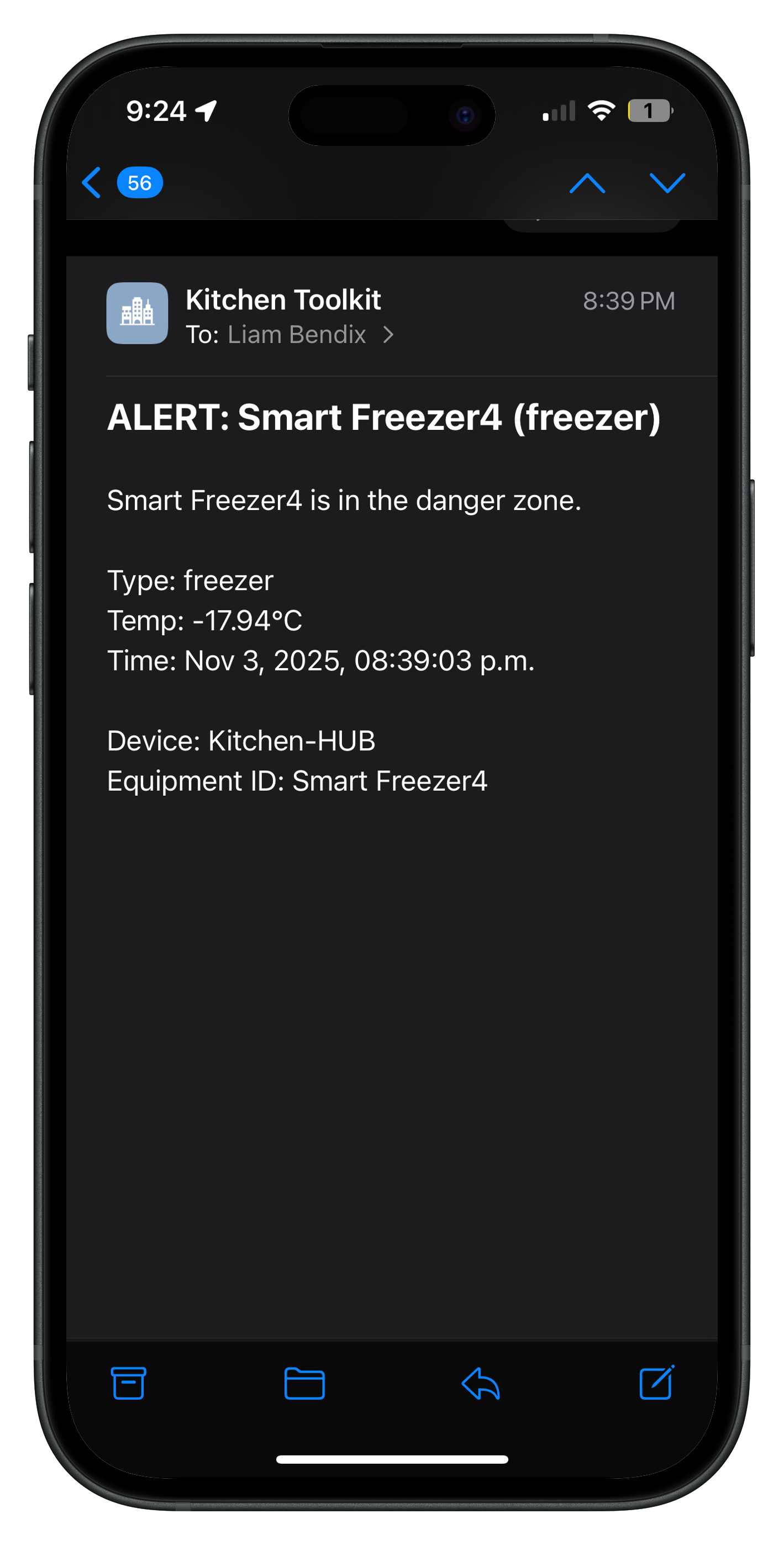
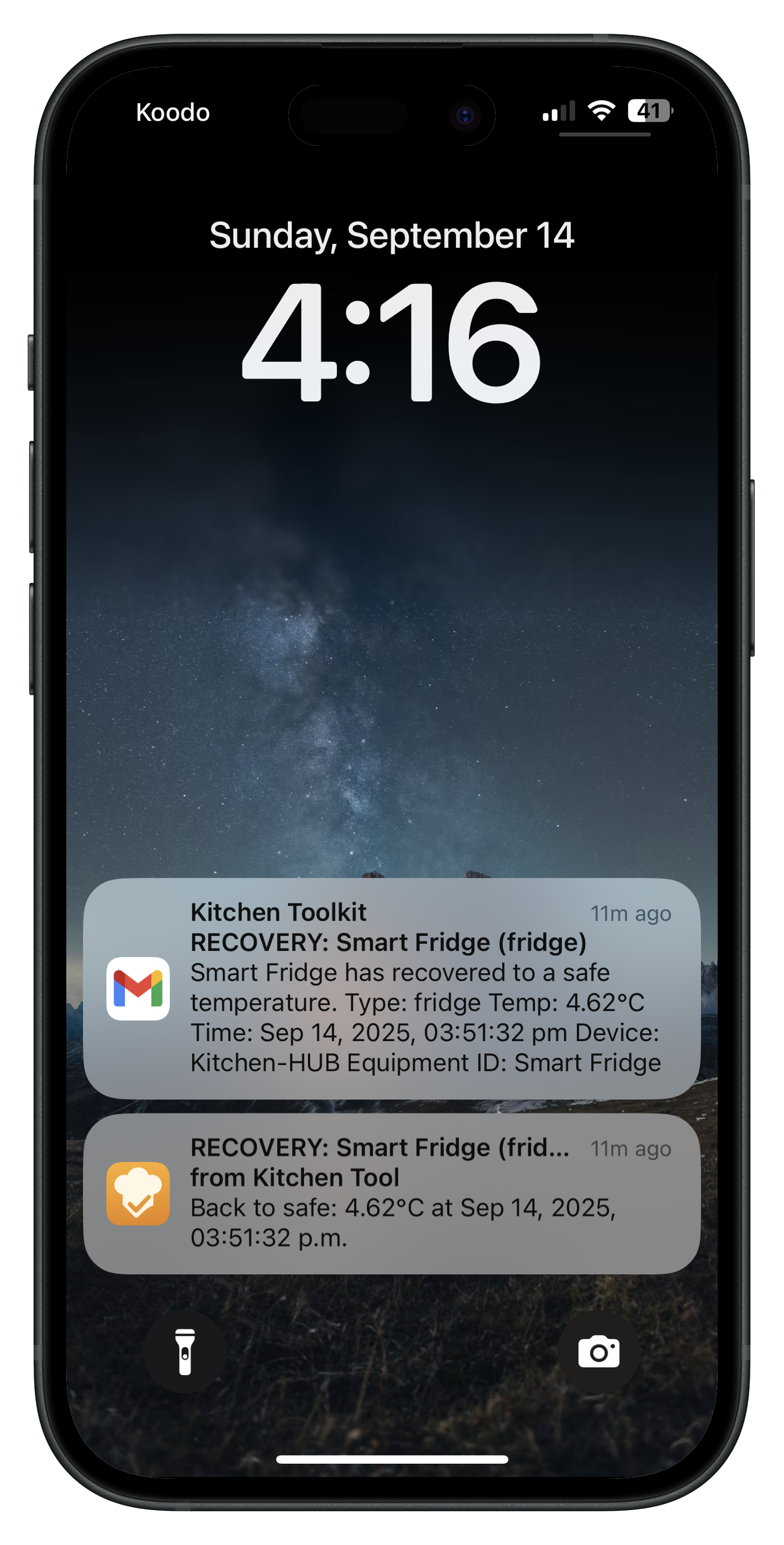
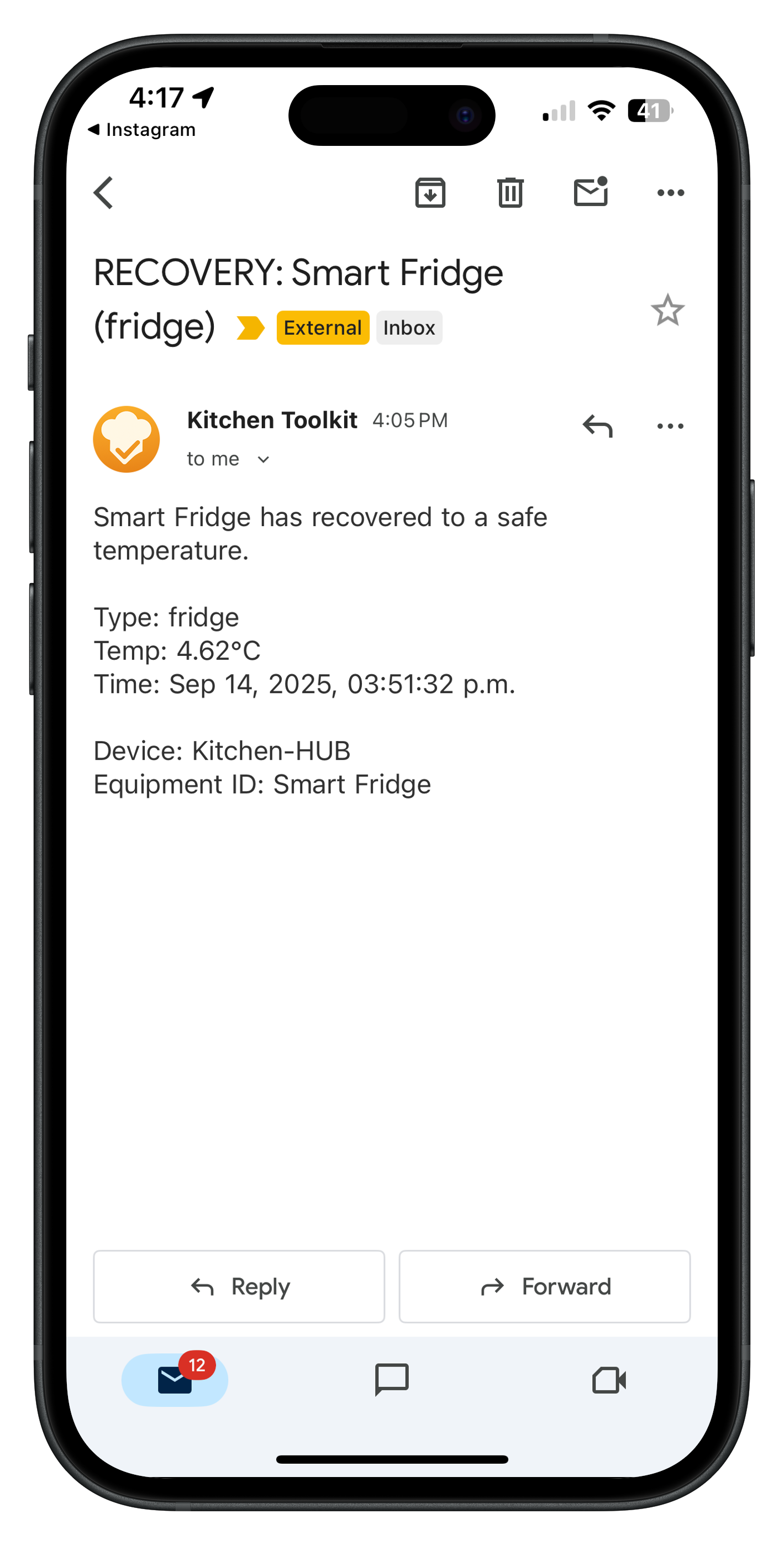
Danger-zone, escalated emergency, warning, and recovery notifications are visible across channels, and heartbeat alerts flag silent hubs or sensors before records or follow-up checks are delayed.

Lock-screen fridge danger alert notification Kitchen Toolkit danger alert email example one Kitchen Toolkit smart freezer alert email Kitchen Toolkit smart freezer follow-up alert email Kitchen Toolkit warning alert email

What the alert engine covers

The alert stack handles threshold breaches, additional escalations for emergency temperature readings, recoveries, and heartbeat silence so teams can review whether a risk is food temperature, device health, or connectivity.

  • Alert screenshots include lock-screen push and multiple email examples.
  • Escalated alerts apply to fridge readings above 10°C at any point or sustained above 8°C, and freezer readings above -5°C at any point or sustained above -10°C.
  • Heartbeat alerts surface silent hubs/nodes before logs drift stale.
  • Notification records can support audits, investigations, and operator training.
Graphs preview

Charts have their own analytics section.

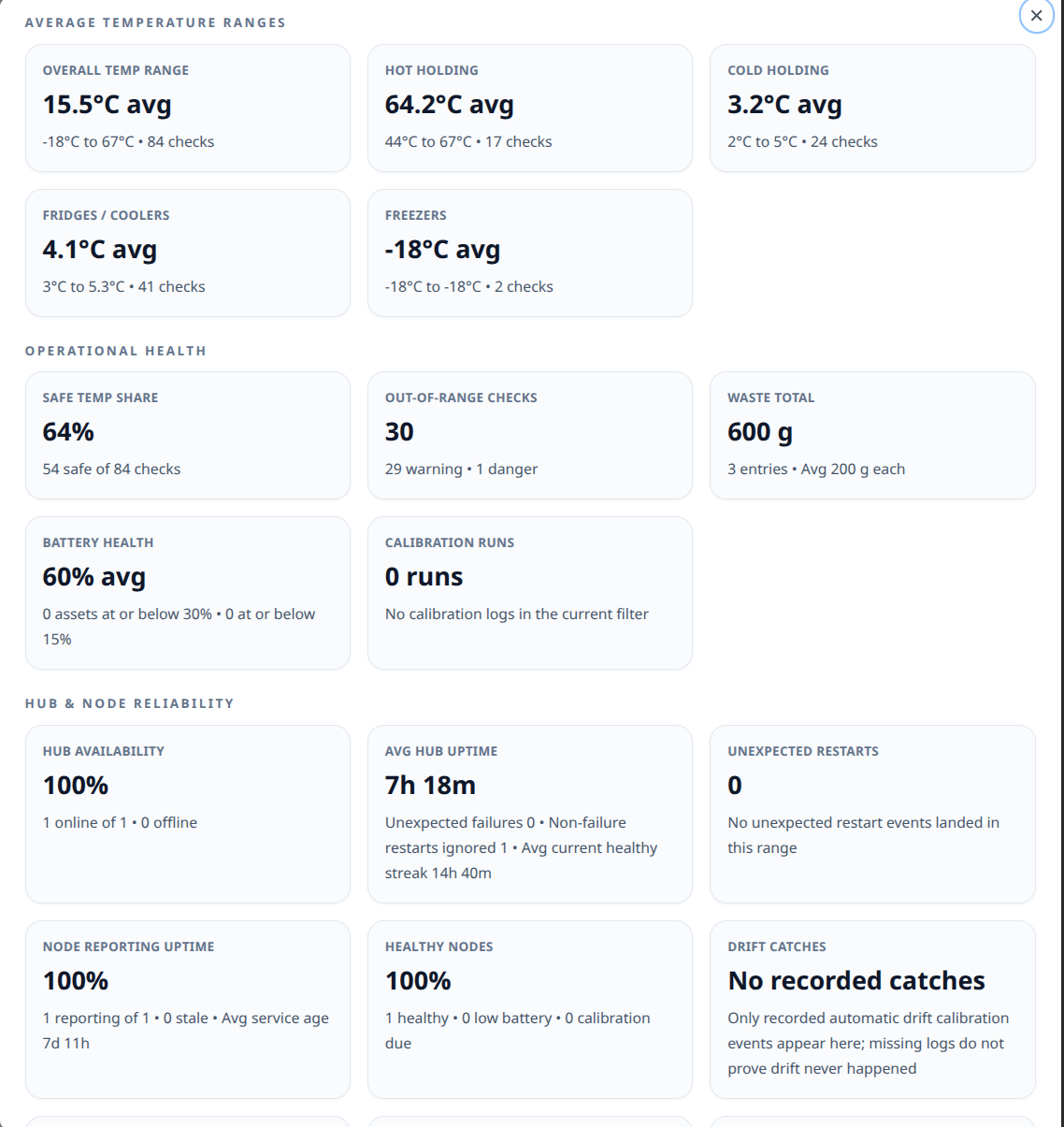
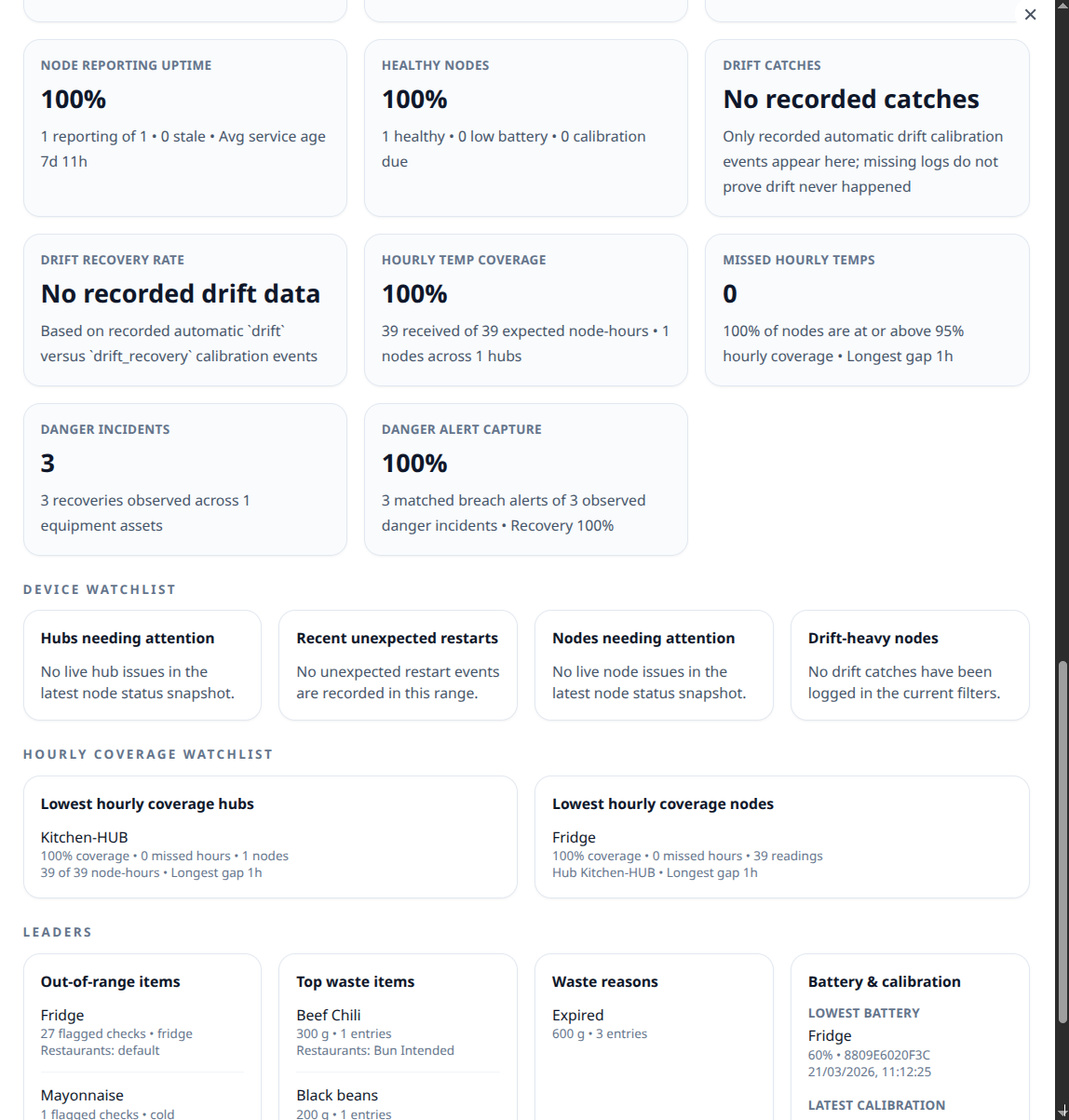
Temperature-zone and waste charts now sit inside a broader stats review, so leaders can check temperatures, waste, batteries, calibrations, and device reliability in the same pass.

Kitchen Toolkit dashboard stats overview screenshot Kitchen Toolkit dashboard stats detail screenshot

Deeper stats without a second dashboard

The stats panel now goes well beyond two charts. Managers can review temperature ranges and safe temp share, waste totals and reasons, battery levels, factory-calibrated versus verified node posture, plus hub uptime, missed hourly reporting, drift catches, and danger-alert capture before they hand the same view to QA or ops.

  • Overview, operational health, reliability, watchlists, and leaderboards now sit beside the charts.
  • Teams can switch stats by week, month, or all time and pivot waste units between g, kg, oz, and packs.
  • Share / Export Stats packages the current review into a CSV that can open the device share sheet or download directly.
Savings you feel

Less paper, less labour, fewer surprises.

From shift change to audits, Kitchen Toolkit shows where time and money return to the team.

Time back for staff

Push reminders replace clipboard chasing. Managers reclaim hours by skipping manual exports, binder audits, and escalation calls while crews close faster.

Lower paper & rework

Digital checklists and recipes mean no reprinting. Corrections are logged with who/when, and structured waste logs help chefs adjust prep to reduce overproduction.

Audit support

CSV exports and charts for waste and temps help teams prepare records for inspections. Logs include timestamps and signatures where available so compliance documentation is faster to assemble.

Training accelerated

Searchable SOPs and checklists let new hires shadow digitally, with clearer onboarding paths and fewer handoff gaps during busy shifts.

Hardware optional

Keep humans in the loop or let nodes handle temps. Choose email, push, cloud, or local exports depending on what your teams prefer and infrastructure allows.

Builder preview

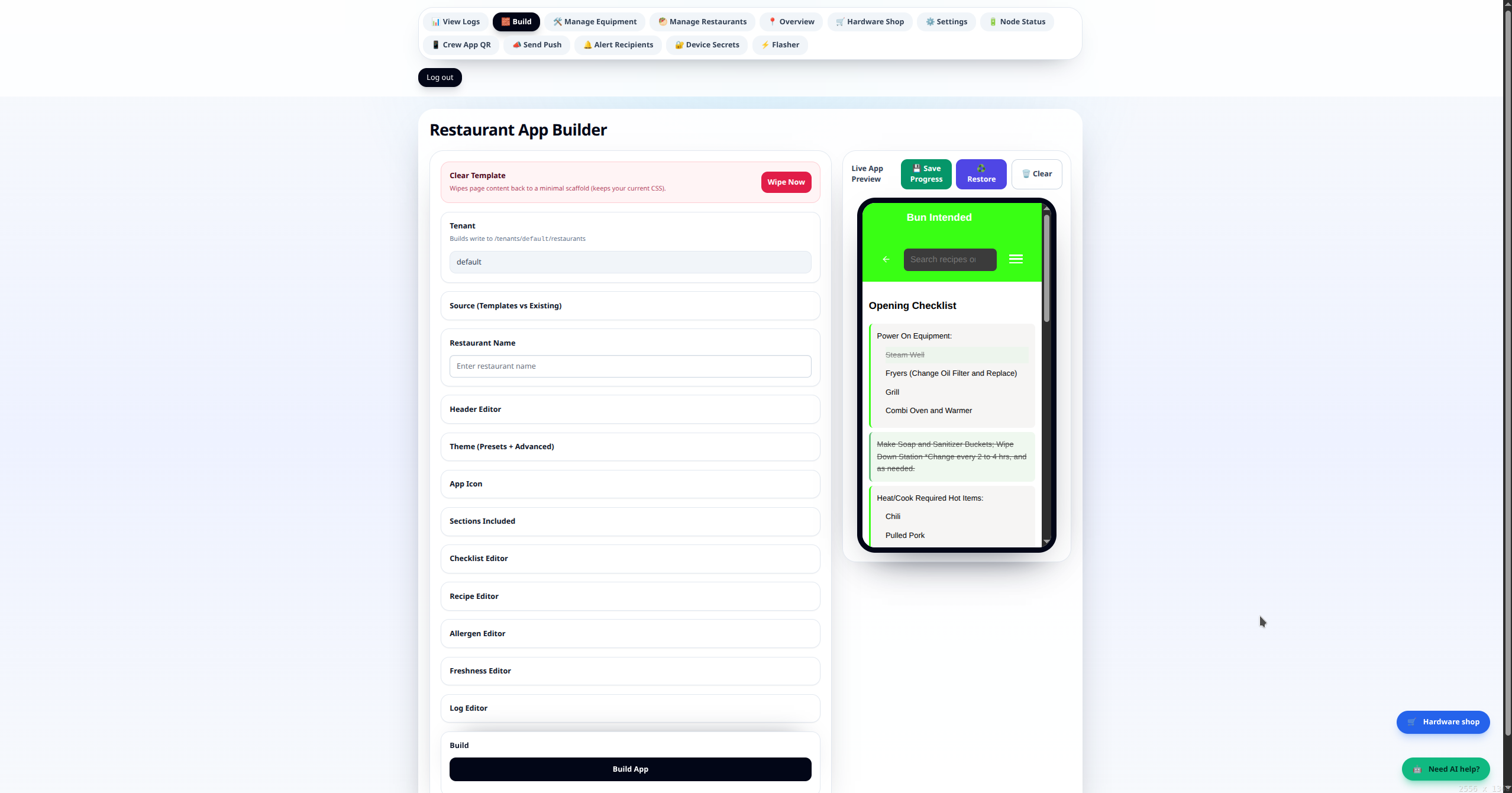
Builder: publish restaurant updates without app store delays.

The builder is an app that ships apps. Teams can update menus, checklists, allergens, and SOP content quickly, with offline delivery preserved for each location.

Restaurant Builder with live app preview and configuration controls

Content operations in one workflow

Operations teams can draft, preview, and publish changes in one place while keeping each account and restaurant bundle isolated.

  • Per-account manifests keep branding and content boundaries clean.
  • Platform mirroring keeps restaurant bundles available for offline installs.
  • Live preview helps trainers verify changes before rollout.
Sensor showcase

Hubs and sensors at a glance for real kitchen coverage.

This section keeps hardware simple and visual so teams can understand how sensor coverage and drift-triggered verification work in production kitchens.

Hub & node guide

How hub + node sensors work in the kitchen.

A hub is the always-on gateway that receives readings and sends them to your dashboard, while nodes are the small sensors placed on equipment with factory-calibrated probes. Together they help maintain monitoring coverage in areas where normal Wi-Fi is unreliable, without putting probes on a scheduled recalibration cycle.

Hub (gateway role)

The hub is the always-on bridge between local sensors and the platform. It stays online, monitors sensor health, and forwards readings and status updates to the dashboard.

  • Receives wireless readings from the nearby node fleet.
  • Buffers locally and replays after the connection comes back.
  • Supports overlapping coverage when one node needs to stay visible through more than one hub.

Node (sensor role)

The node is the battery-powered sensor endpoint mounted near monitored equipment. It samples temperature with a factory-calibrated probe and sends periodic updates to the assigned hub.

  • Captures equipment-side measurements on a fixed cadence with a factory-calibrated probe.
  • Sends battery and signal-health context with samples.
  • Is designed as set-and-forget hardware, not a scheduled recalibration chore.
  • Only asks for verification when sustained drift is detected or after service work changes the probe.

Provisioning, recovery, and remote updates

Hardware setup is part of operations: devices are flashed, credentialed, and validated before deployment, then maintained with local recovery tools and published updates.

  • Use the browser flasher once for the initial role-specific install.
  • Join the maintenance AP or local dashboard later for credential changes and recovery.
  • Publish new app firmware and hubs can roll forward without wiping saved provisioning.
  • Admin can confirm current firmware and whether each hub is up to date.
Connectivity architecture

Restricted Wi-Fi is why deployments use a dedicated LTE gateway.

Universities, public Wi-Fi, and enterprise networks often require browser logins or managed-device credentials that unattended hardware cannot complete reliably. Instead of borrowing that infrastructure, Kitchen Toolkit can give the hub its own outbound cellular path.

Kitchen Toolkit connectivity architecture showing the hub using Wi-Fi, Ethernet, or LTE with secure outbound-only internet access.

Transport options

Hub networking supports Wi-Fi, direct Ethernet, or downstream Ethernet into a dedicated LTE uplink. The router handles the WAN session while the hub receives private LAN connectivity locally.

Carrier-agnostic LTE path

A dedicated LTE router paired with a carrier-agnostic IoT SIM provides a self-contained cellular uplink. The SIM supports automatic network selection and can attach to the strongest available supported carrier.

Security model

In the normal deployment model, telemetry and health traffic leave over HTTPS, router-level NAT reduces direct inbound reachability, and no inbound ports or public-facing services are required.

Operational behavior

Combined LTE plus Ethernet handoff yields a headless plug-and-play deployment model. Router watchdog and reconnect behavior, paired with queued outbound replay on the hub, make the path self-healing after transient WAN faults.

Connectivity + security detail

  • Hubs can operate over Wi-Fi, direct Ethernet, or Ethernet into an LTE router uplink, depending on site conditions.
  • The dedicated LTE router provides NAT, DHCP, LTE session handling, and router-level watchdog/reconnect behavior.
  • The carrier-agnostic IoT SIM uses automatic network selection for multi-network resilience.
  • All WAN traffic is outbound-only HTTPS to cloud endpoints; the deployment does not require inbound ports.
  • Router-level NAT keeps the hub off the public internet and prevents direct addressing in the standard deployment model.
  • The result is a self-healing, fully headless, plug-and-play path that works in restrictive environments without captive-portal or 802.1X friction.
See the full connectivity architecture →
Pilot readiness

Launch with a clear first-site plan.

Once the operating model and hardware path are clear, this section focuses on standing up the first kitchen quickly and cleanly.

Pilot readiness

Plan to bring your first locations online quickly.

We are finishing compliance packaging and scheduling supervised pilots. Here is the rollout we use to stand up each kitchen once pilots begin.

1. Configure your account

Sign up and start with hosted defaults. If you prefer, connect your own email or alert settings from the admin console. We host the stack while keeping supported data, export, retention, and alert controls visible in the product.

2. Publish bundles

Use the builder to import checklists, recipes, allergens, and SOPs. The platform mirrors bundles for offline installs during deploy.

3. Flash hubs & nodes

Use the guided provisioning flow to load firmware and secrets, then pair nodes. The admin console confirms heartbeats and device status.

4. Train & measure

Staff use the help desk for SOPs; managers export logs and monitor alerts. We review time saved, alerts caught, and paper removed before scaling.

Pilot intake

Ready to see it in your kitchens?

Kitchen Toolkit is built for supervised pilots and commercial kitchen rollouts. We’ll tailor the demo to your menus, equipment, and alerting rules—no slide decks, just the live stack.

Sales, pilots, and deployment intake are for business, institutional, and professional kitchen operators. Hardware supplied for current pilots may include evaluation or pre-certification units for supervised indoor use only until released otherwise in writing.